

Smart living is no longer a luxury add-on—it’s the new baseline for what a modern Philippine condo should feel like. Buyers and renters have evolved fast, and their expectations have risen even faster. A unit that delivers security you can trust, cooling that doesn’t punish your Meralco bill, and technology that quietly does the work for you now stands miles ahead of the typical “fresh paint, good location” listings that dominate the market.
Today’s renters chase convenience.
OFWs want visibility and control from abroad.
Tech-forward end-users want a home that feels like it’s built for the year 2025—not stuck in the pre-smart era.
If your unit delivers that combination, you instantly position yourself in the top tier of your building’s inventory. Smart upgrades create an experience that feels premium, efficient, secure, and thoughtfully designed. They don’t just make your condo “nicer.” They make it more livable, more desirable, and more profitable.
This guide shows you exactly how to pull that off—minus the jargon, confusion, and gimmicks. You’ll get PH-specific cost ranges, ROI benchmarks, upgrade priorities, and staging strategies that help your condo photograph better, show better, and rent or sell faster. Whether you’re preparing to lease out a 30sqm studio, renovate a family-sized 2BR, or simply want a future-ready home, you’ll know exactly which upgrades deliver the strongest impact.
Pro Tip:
Most condo owners think smart upgrades are expensive. They’re not. Done strategically, they’re one of the highest-ROI improvements you can make in a Philippine condo—often paying for themselves in months, not years.
What Counts as a Smart Home Upgrade?
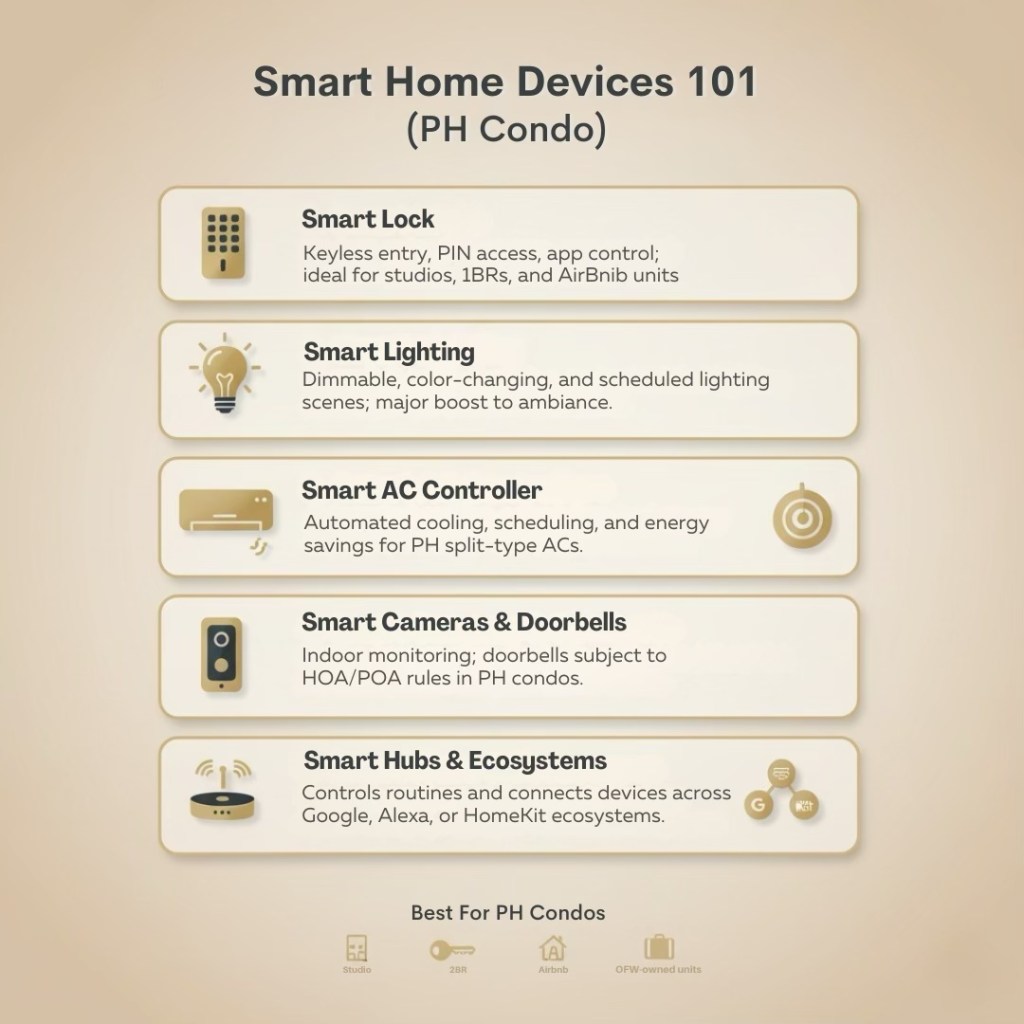
A smart home upgrade is any device or system that responds, adjusts, or automates tasks based on how you actually live. In the Philippine condo context—where space is compact, energy costs are high, and convenience matters—the right smart upgrades deliver real, measurable benefits. They improve safety, optimize electricity use, and elevate the condo’s overall feel without requiring renovation.
Below are the core components that define a true “smart condo” in Metro Manila, complete with PH-specific examples you can use when educating buyers, renters, or investors.
Smart Locks
The most requested upgrade in PH condos—and the easiest lifestyle win. Smart locks replace keys with:
- PIN codes
- Biometric fingerprint access
- RFID
- Mobile app or Bluetooth access
Why they matter in PH:
- Perfect for OFWs who need remote control over cleaners, caretakers, and long-term tenants
- Airbnb hosts rely on them for seamless, contactless check-ins
- Young professionals love them because lost keys become a thing of the past
- Investors appreciate the reduced admin work during turnovers
Common Installations:
Makati studios, BGC 1BR rentals, Ortigas and QC Airbnb units.
Smart Sensors
Tiny devices that trigger automations, monitor conditions, or send alerts.
PH Use Cases:
- Motion sensors for narrow condo hallways
- Temperature sensors for humid bedrooms
- Door/window sensors for added safety in family units
- Water leak sensors in older units prone to condensation or under-sink leaks
These sensors are small investments with oversized benefits, especially in safety-conscious buildings.
Smart Lighting Systems
Lighting has one of the biggest visual impacts inside a condo—and smart lighting takes it further.
Types:
- Smart Bulbs: Dimming, color-changing, scheduling
- Smart Switches: Cleaner look; controls multiple fixtures
- Scene-Based Lighting: Presets that instantly change the mood
Where they shine in PH condos:
- 1BR units staged with warm “hotel-like” scenes for resale
- Work-from-home setups with bright daylight presets
- Bedroom wind-down programs for families
Lighting is your secret weapon for better listing photos.
Smart Thermostats & AC Controllers
Most PH condos don’t use central thermostats, but smart AC controllers are a perfect fit for units with split-type ACs.
Why they’re powerful:
- Reduce energy bills by 10–25%
- Allow remote on/off control
- Monitor electricity consumption
- Sync with schedules and routines
This is one of the highest-ROI smart upgrades for PH condo living.
Home Hubs & Automation Systems
Your “brain” of the smart condo. These systems tie your devices together so your condo responds automatically—lights dim at night, AC adjusts when you leave, and locks secure themselves.
Philippine-Available Ecosystems:
- Google Home — Most common; easy setup; great for Android users.
- Amazon Alexa — Strong automations; widely supported devices.
- Apple HomeKit — Best for Apple ecosystems; known for security.
Tip: Sticking to one ecosystem makes your setup smoother and more stable—buyers love consistency.
Smart Cameras & Video Doorbells
Indoor cameras and doorbells with two-way audio, motion detection, and cloud recording. OFW owners love them; renters feel safer; investors use them for check-in/out documentation.
Reminder:
- Some condos DO NOT allow external-facing doorbells or hallway cameras.
- Indoor units are generally allowed.
Smart Plugs & Appliances
The easiest upgrade category—turn any appliance “smart” by plugging it into a controllable outlet. Great for lamps, humidifiers, coffee makers, fans, and routers.
In a Nutshell
A legitimate smart home upgrade must offer at least ONE of these:
Automation | Remote Control | Scheduling | Monitoring | Energy Optimization
If it doesn’t improve daily living or reduce effort, it’s just a device—not a smart upgrade.
Pro Tip:
If your devices can’t communicate with each other, you don’t have a smart home—you have a box of electronics. Choosing the right ecosystem matters more than the number of gadgets you own.
Why Smart Upgrades Are a High-ROI Move for Condo Owners
Smart home upgrades aren’t gimmicks—they’re ROI engines. In the Philippine condo market, where units often compete within the same size range, the same layout, and the same building, smart features become the differentiator that pushes your unit ahead of everyone else.
Smart upgrades improve marketability, tenant satisfaction, operational efficiency, and long-term value. Below are the strongest, data-backed reasons these upgrades consistently outperform traditional renovations.
Higher Rental Premiums (PH Market Uplift)
Across Metro Manila’s most active rental clusters—BGC, Makati, Ortigas, Mandaluyong, and QC—units with smart features command noticeably higher rents.
Average rental uplift: ₱1,500 to ₱4,000 per month
(depends on package, location, and building profile)
Upgrades that drive this premium:
- Smart locks
- Smart AC controllers
- Smart lighting
- Mesh Wi-Fi
- Indoor cameras
- Automation presets
Renters pay more because these upgrades solve real pain points:
security, convenience, comfort, and energy savings.
Shorter Vacancy Periods
Listings with smart features attract serious prospects. The market reads them as “move-in-ready” and “higher value.”
Vacancy reduction: 20–40% faster to lease out
(based on 2023–2024 Metro Manila leasing data)
Two drivers make this happen
Better listing photos
Smart lighting elevates ambiance dramatically.
Higher perceived value
Tenants feel they’re renting into a better lifestyle, not just a square meter count.
In competitive areas like BGC and Makati, this alone can save owners tens of thousands of pesos per year.
Energy Savings: Real Numbers for Split-Type ACs
Air conditioning is the biggest electricity cost in Philippine condos. Smart AC controllers optimize runtime, scheduling, and temperature curves so your AC works smarter—not harder.
Typical PH setup:
Split-type AC running 6–10 hours/day
Electricity cost: ₱11–₱14/kWh (Meralco average)
Manual AC use cost:
₱2,000–₱3,800/month
(depending on hours and AC model)
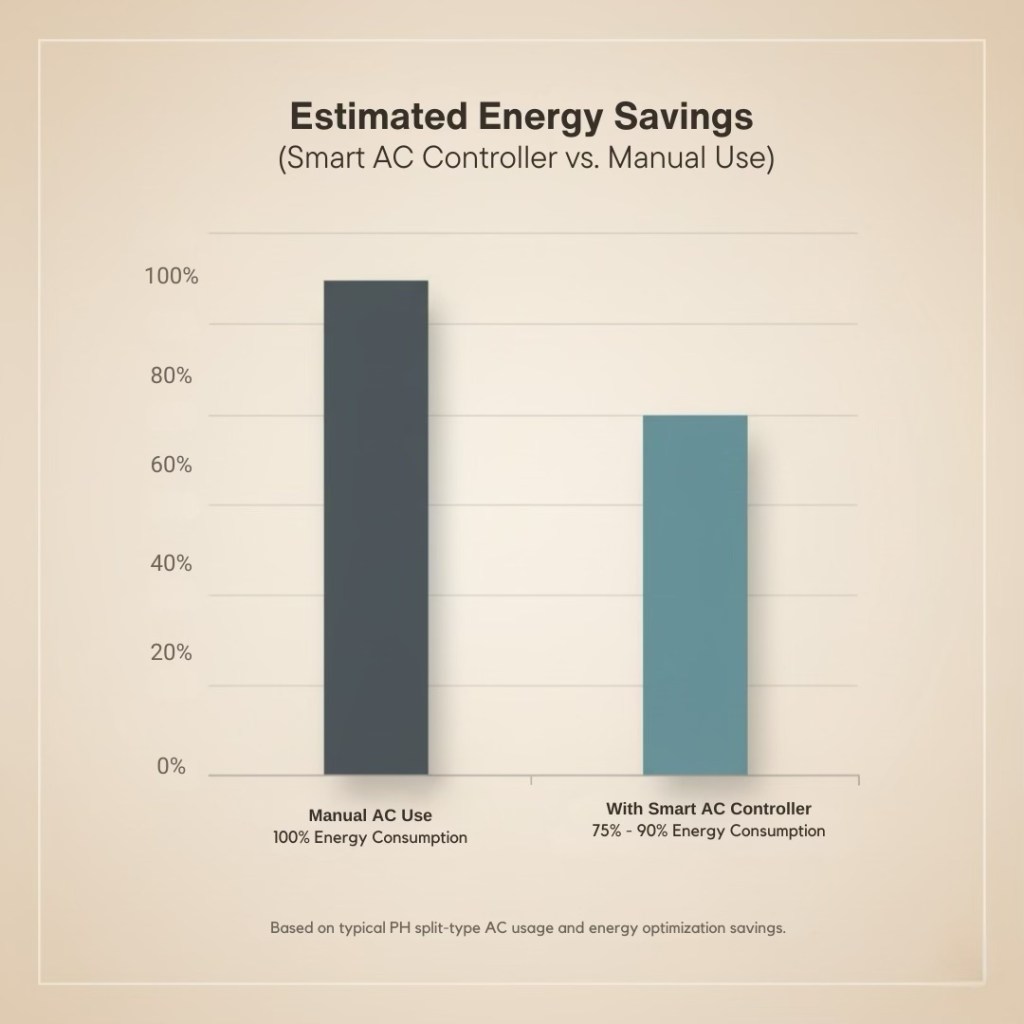
With smart AC controller:
- 10–25% energy reduction
- Remote off/on control
- Automated routines
- Geofencing (“turn off when I leave”)
- Usage monitoring
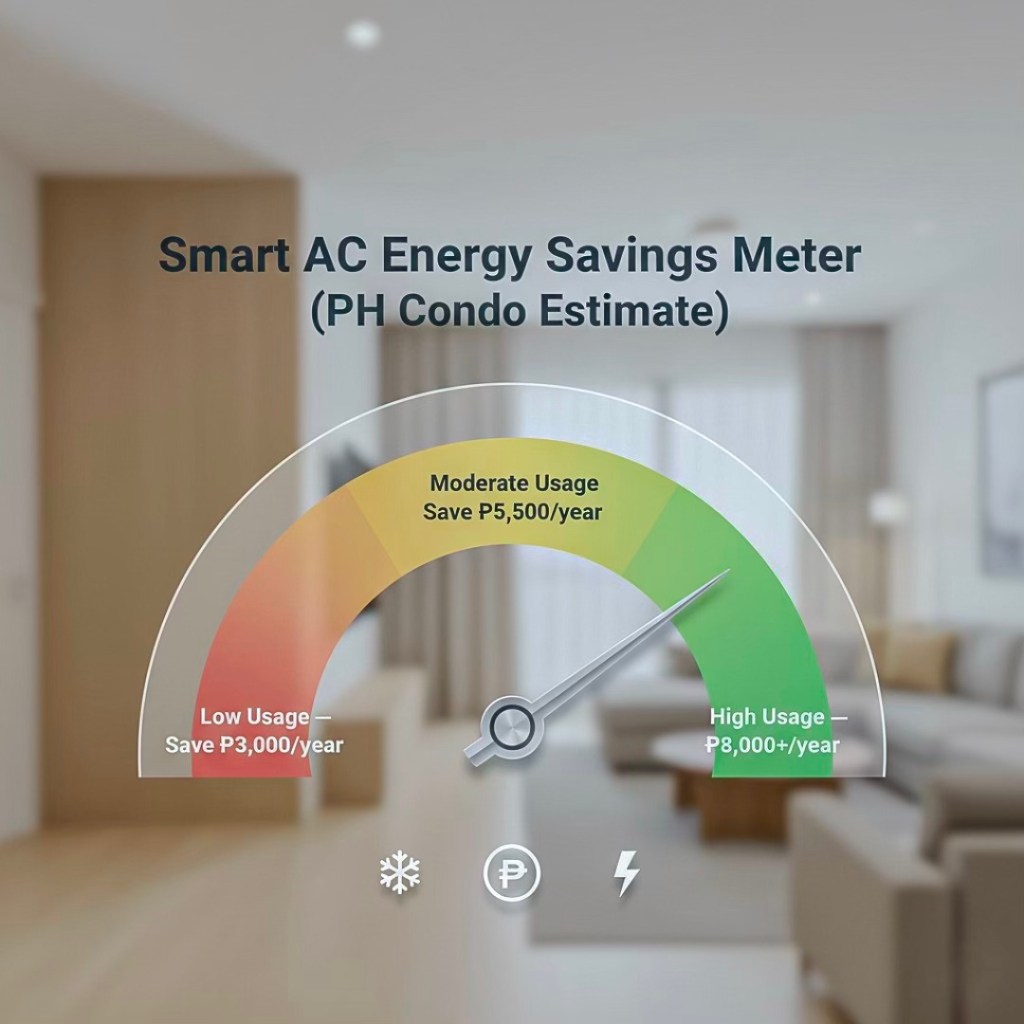
Savings example:
Monthly AC cost
₱3,000
20% reduction
₱600 saved per month
Annual savings
₱7,200
Cost Anchor:
A ₱3,000–₱9,000 smart AC controller can pay for itself in as little as 3 months.
Massive Appeal to Young Professionals & Expats
This segment doesn’t dream of “traditional living.” They want convenience and control. They expect technology to simplify their routines.
What appeals most:
- Keyless entry (smart locks)
- Smart lighting with presets (WFH, evening, relaxation)
- High-speed mesh Wi-Fi
- App-controlled cooling
- Automation routines (“Good Morning,” “Good Night,” “Going Out”)
These tenants value ease, control, and lifestyle alignment.
Smart upgrades help your unit feel like an international-standard home—especially attractive to BGC expats and Makati executives.
Stronger Resale Value & Modern Perception
Buyers pay more for what feels updated, future-ready, and thoughtfully upgraded. A smart-ready unit feels like a 2025 condo, not a 2010 condo with new paint.
Resale impact:
- Price premium: ₱50,000–₱150,000, depending on the package
- Faster buyer decision-making
- Higher perceived care and maintenance
- Competitive edge against similar units
- Better negotiation leverage—“modernized,” “energy-smart,” “security-enhanced” are powerful anchors
Real Insight:
Buyers don’t fall in love with square footage—they fall in love with how a space feels.
Investment Impact Matrix — Cost vs. Rental/Resale Value
| Upgrade Type | Typical Cost (₱) | Rental Impact | Resale Impact | ROI Speed | Notes |
|---|---|---|---|---|---|
| Smart Lock | 4,000–15,000 | ★★★★☆ | ★★★★★ | Fast | #1 renter demand |
| Smart AC Controller | 3,000–9,000 | ★★★☆☆ | ★★★★☆ | Very Fast | Cuts AC bills immediately |
| Smart Lighting | 1,500–12,000 | ★★★★☆ | ★★★★☆ | Medium | Huge visual upgrade |
| Mesh Wi-Fi | 6,000–20,000 | ★★☆☆☆ | ★★★★★ | Medium | Essential for concrete walls |
| Indoor Camera | 1,800–8,000 | ★★★☆☆ | ★★★★☆ | Fast | OFW favorite |
| Automation Hub | 3,000–9,000 | ★★★☆☆ | ★★★☆☆ | Medium | Best in full setups |
Legend:
★★★★★ = Strongest impact
★☆☆☆☆ = Minimal impact
Smart upgrades deliver real financial returns:
- Higher rent
- Faster lease-outs
- Lower electricity bills
- Stronger resale value
- Better listing performance
- Higher tenant satisfaction
For condo owners, few upgrades offer ROI this consistently—and this fast.
Essential Smart Home Features for Condos (Philippines-Focused)
The strongest smart upgrades are those that address real frustrations inside a Philippine condo: limited space, high electricity costs, dead-spot Wi-Fi, and the need for improved security. These features deliver the biggest impact on buyer appeal, rental performance, family comfort, and everyday convenience.
Below are the five categories every condo owner should prioritize—ranked by ROI, livability, and market demand.
Smart Security
Security isn’t optional in Metro Manila—it’s the foundation of a modern condo. Even buildings with strict lobby protocols benefit from in-unit smart systems that give owners real-time visibility and control.
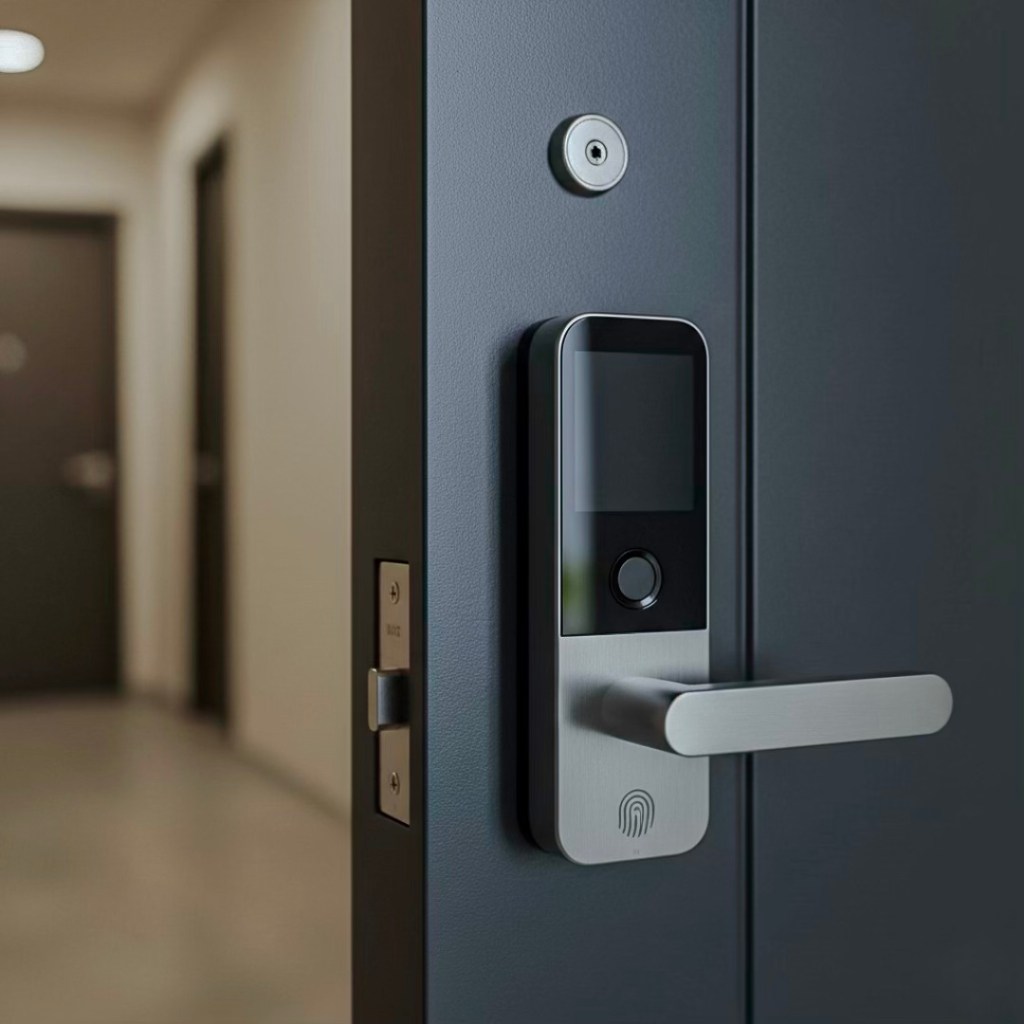
Smart Locks
The #1 smart upgrade in PH condos—and for good reason. Smart locks eliminate lost keys, reduce turnover hassle, and let owners grant temporary access remotely. OFW owners particularly love them because they remove all coordination stress with caretakers or tenants.
Benefits:
- PIN, biometric, or app-based entry
- Guest access codes for cleaners or Airbnb guests
- Automatic locking for added security
- Strong selling point in listings
Video Doorbells
In buildings that allow them, video doorbells let you see visitors, deliveries, or unexpected arrivals—ideal for working professionals and OFWs.
HOA/POA Reality Check:
- Some PH condos restrict doorbells with outdoor cameras.
- Always confirm building rules before installation.
CCTV & Cloud Storage
Indoor cameras are widely allowed and incredibly helpful for:
- Remote property checks
- Monitoring cleaners or contractors
- Airbnb documentation
- Baby monitoring for families
Cloud storage ensures footage remains accessible even if the device is tampered with.
Motion Sensors & Door/Window Sensors
These tiny, inexpensive devices add a powerful layer of protection. They trigger alerts, activate lights, or start recording automatically.
- Motion-activated hallway lights
- Alerts when doors or windows open unexpectedly
- Safety automation for kids or elderly family members
Climate & Energy Control
Cooling consumes the majority of condo electricity bills in the Philippines. Smart climate tech helps you spend less, stay comfortable, and maintain better control—even when you’re not home.
Smart Thermostats (for units with centralized cooling)
Traditional thermostats aren’t common in PH condos, but premium properties with centralized cooling.
Benefits:
- Automatic temperature optimization
- Energy-efficient scheduling
- Remote control from your phone
Smart AC Controllers for Split-Type Units
This is where the real energy savings happen. Smart AC controllers are compatible with the majority of split-type ACs used across Manila condos.
Benefits:
- Temperature automation
- Geofencing (AC turns off when you leave the building)
- Usage tracking to monitor energy consumption
- Manual override from anywhere
Smart Fans
Ideal for units where AC is used sparingly or for families looking to reduce cooling costs. Smart fans adjust speed, respond to temperature shifts, or follow sleep schedules.
Energy Monitoring Plugs
Plug-and-play tools that instantly show which appliances are silently inflating your bill. Perfect for identifying waste and managing rental usage.
Smart Lighting & Ambiance
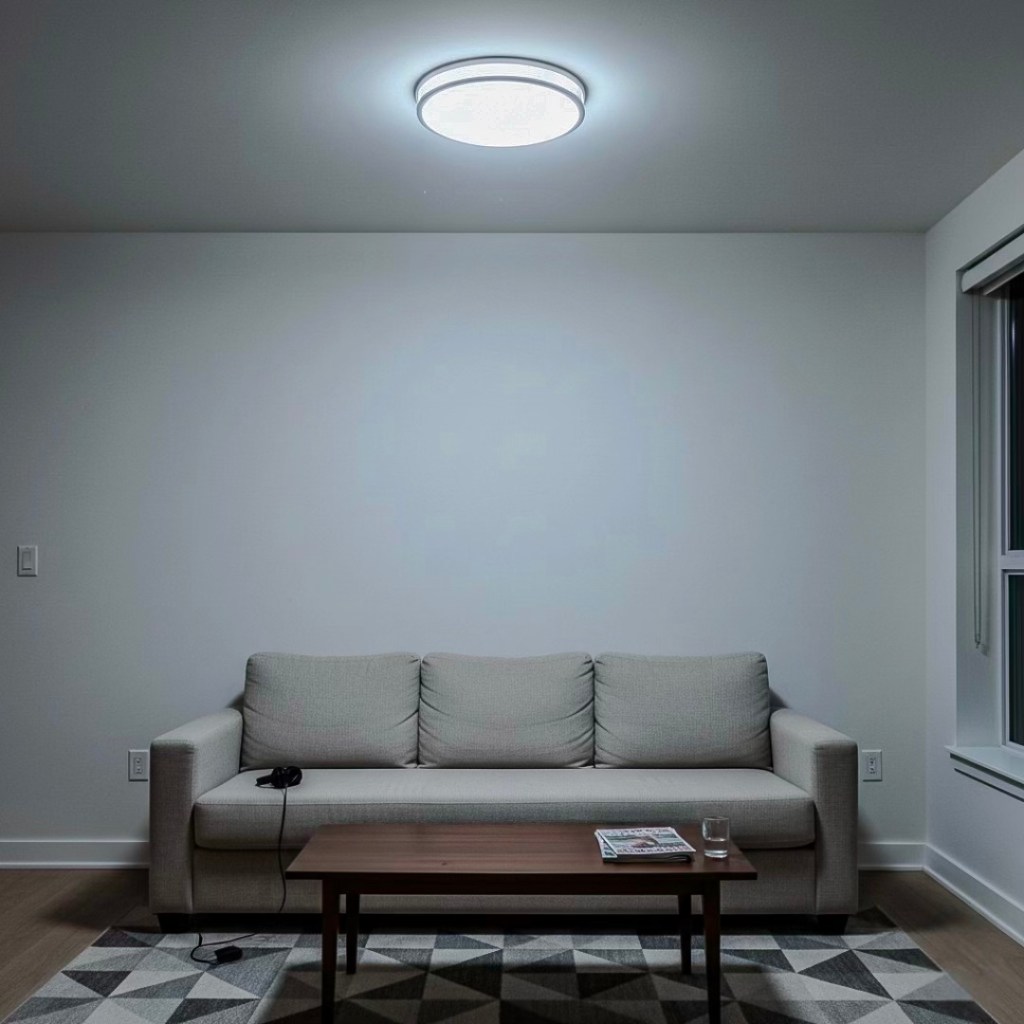
Before the Smart Lighting Upgrade
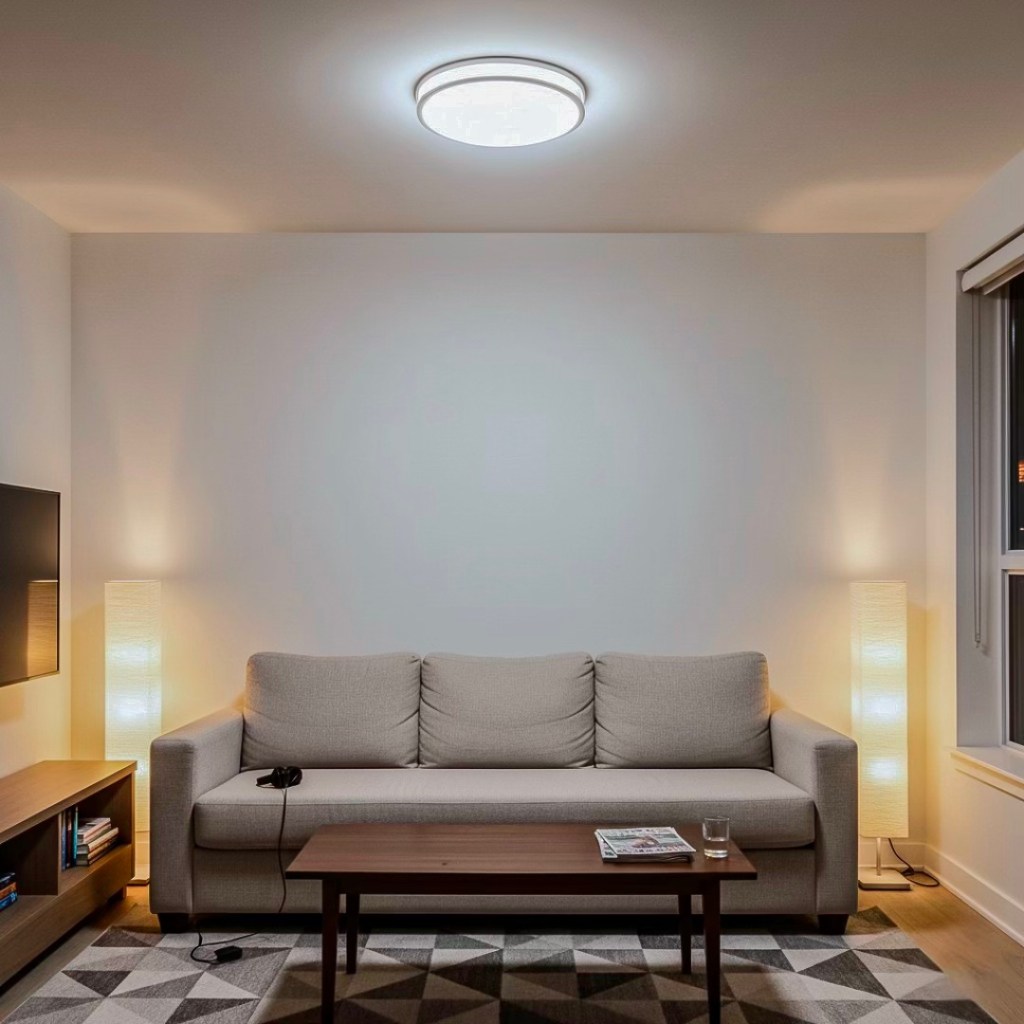
After the Smart Lighting Upgrade
Lighting dramatically improves your condo’s mood, visual appeal, and listing photos. It’s one of the fastest, cheapest ways to modernize a space without renovation.
Smart Bulbs vs. Smart Switches
Smart Bulbs
Quick, beginner-friendly, color and dimming control.
Smart Switches
Cleaner look, perfect for long-term upgrades, and supports multiple light fixtures at once.
Scene Presets That Transform Condo Living
Work-From-Home Mode
Bright, cool daylight for productivity.
Evening Relax Mode
Warm white dimming for a cozy, hotel-like ambiance.
Entertainment Mode
Color presets synced to movies or music.
Bedroom Wind-Down
Soft lighting paired with AC adjustments for better sleep.
Night Mode for Family Units
Motion-activated “path lights” prevent stumbles during late-night kitchen or bathroom trips—highly useful for families with kids or elderly parents.
Network & Connectivity Backbone
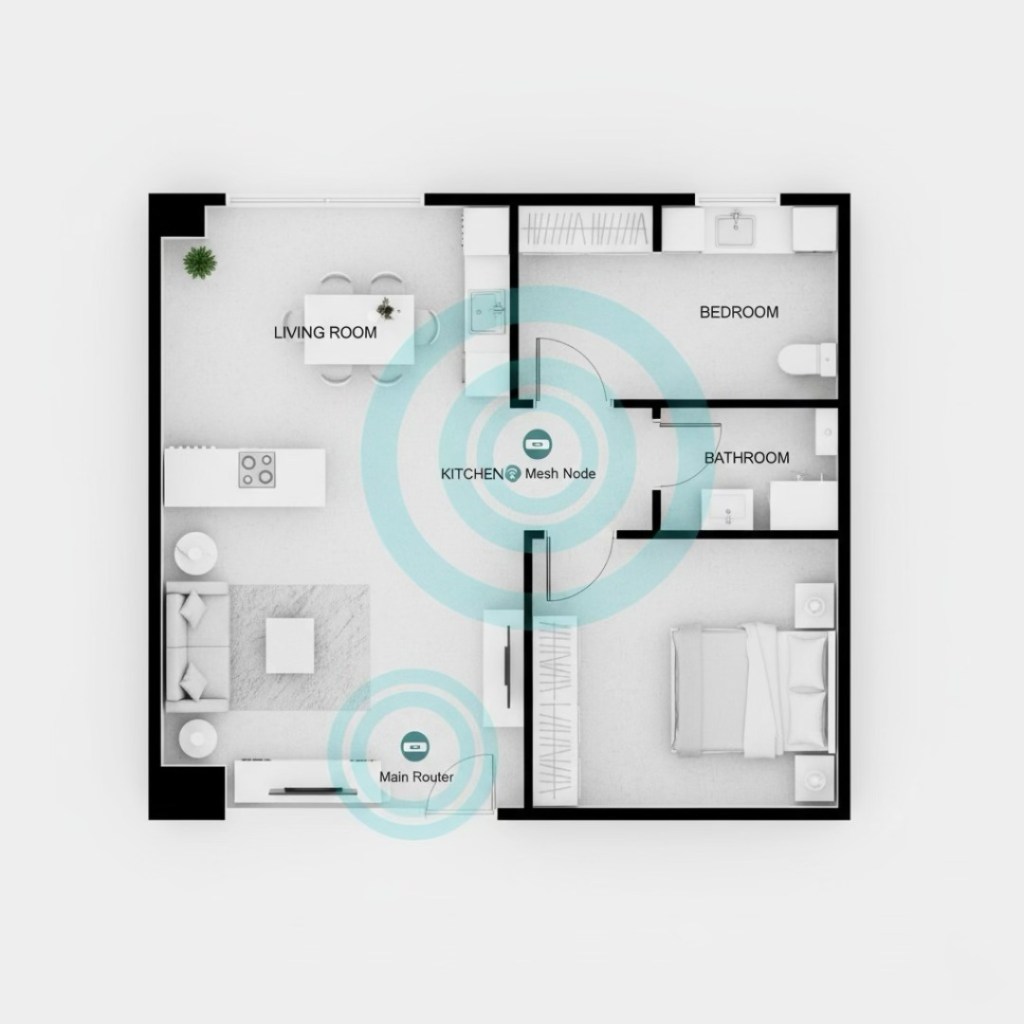
Router and Mesh Node Placement for a 1BR
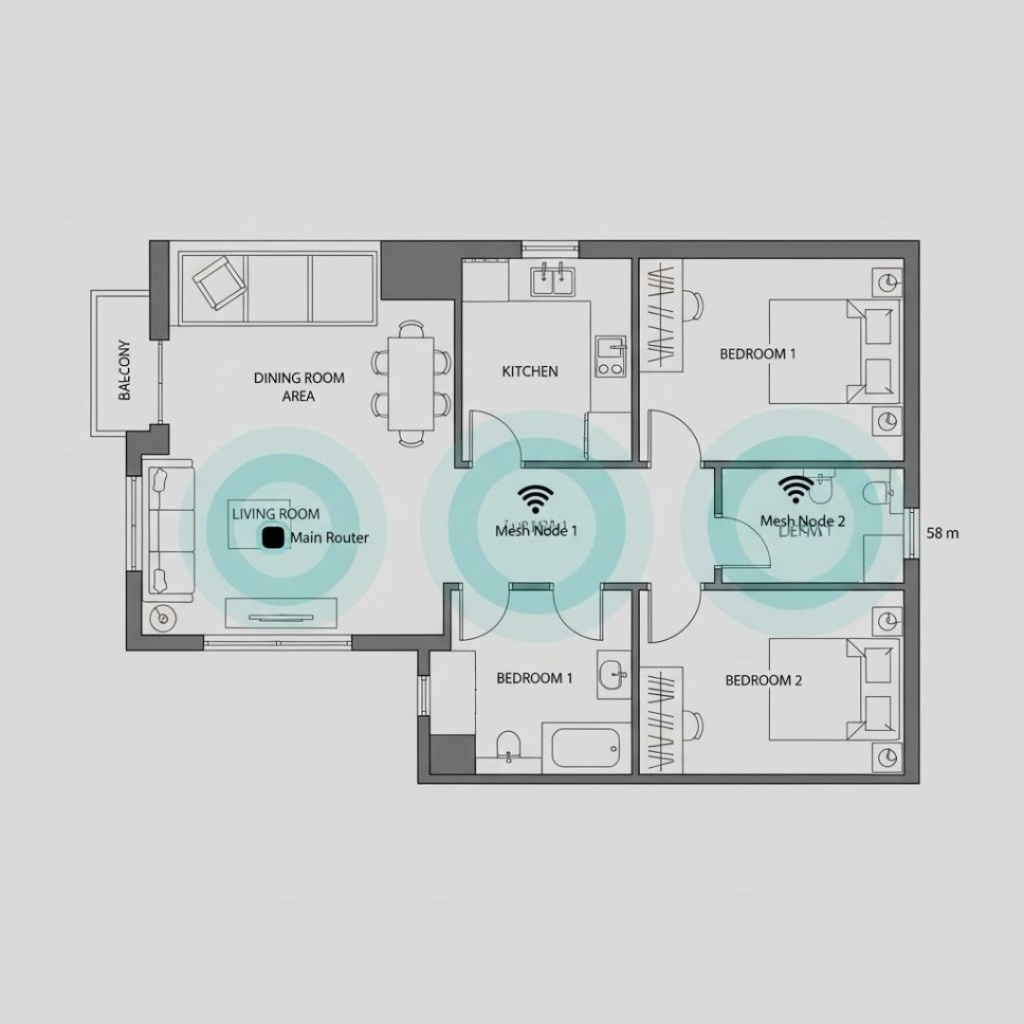
Router and Mesh Node Placement for a 2BR
Your smart home is only as strong as your Wi-Fi. Philippine condos are notorious for dead spots due to concrete walls and compact layouts.
Mesh Wi-Fi Systems for 30–90 sqm Units
Mesh systems deliver uniform coverage so your devices stay connected without random drop-outs—and your Netflix doesn’t freeze during thunderstorms.
Ideal for:
- 1BR and 2BR units
- L-shaped layouts
- Units with multiple walls between the router and bedroom
Proper Router Placement
- Avoid corners, closets, and hidden cabinets.
- Position at chest height in open central locations.
- Keep away from microwaves or appliances that cause interference.
A 10-second reposition can fix years of slow internet.
Guest Network Setup for Airbnb or Rentals
Offering a separate “Guest Wi-Fi” keeps your security intact while giving tenants or guests an easy way to connect. This is standard practice for short-term rentals.
Lifestyle & Convenience Upgrades
These upgrades transform your condo from “modern” to “premium.” They create the small, memorable moments that sway buyers during viewings and impress renters during tours.
Voice Assistants (Google, Alexa, Siri)
Hands-free control for lights, AC, blinds, and music. Great for multitaskers, busy parents, or anyone who loves seamless routines.
Automated Blinds & Smart Curtains
Perfect for condos with strong afternoon sun exposure. Automations can open blinds in the morning and close them during peak heat—saving cooling costs and protecting furniture.
Smart Plugs & Appliance Scheduling
Simple but powerful upgrades:
- Schedule coffee makers
- Automate fans and lamps
- Control humidifiers remotely
- Add routines for nighttime shutdown
Ideal for Airbnb Units
Hosts love these because they help automate:
- Check-in/out
- Lighting
- AC usage
- Security
- Reset routines after guests leave
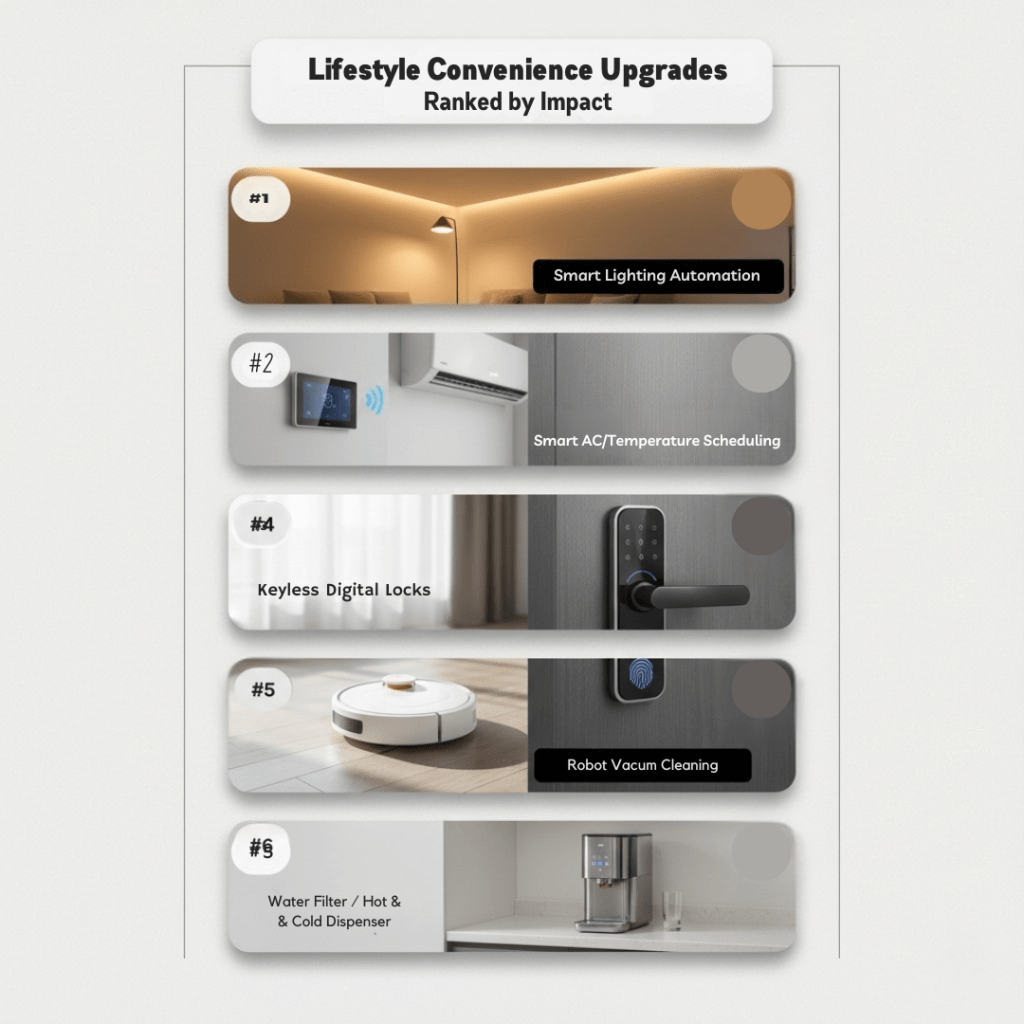
These five categories deliver the strongest improvements in:
These upgrades transform your condo from “modern” to “premium.” They create the small, memorable moments that sway buyers during viewings and impress renters during tours.
- Security
- Energy efficiency
- Aesthetics
- Wi-Fi reliability
- Daily convenience
- Listing appeal
- ProRental profitability
Focus on the essentials first, then expand into automation once your foundation is solid.
Building & Regulatory Considerations
Smart upgrades can transform your condo—but only if they comply with building rules, engineering limits, and Philippine privacy laws. Every condominium has its own set of House Rules, renovation policies, and technical requirements. Overlook them, and you risk fines, forced removals, or the dreaded call from the admin office saying, “Sir/Ma’am, bawal po yan.”
This section gives you the real-world constraints that matter—because even the smartest device only works if the building allows it.
Smart HOA/POA Rules on Drilling, External Cameras, and Wiring
Most Philippine condos protect structural integrity, common areas, and hallway privacy. That means you cannot install every device wherever you want.
Drilling & Structural Work
Not Allowed (common across Metro Manila):
- Drilling into structural walls
- Altering or drilling facing the hallway or façade
- Running wires outside your unit boundaries
- Penetrating fire-rated or shared walls
Usually Allowed:
- Light drilling on non-structural interior walls
- Smart device mounting using adhesives or no-drill brackets
- Installing smart switches, locks, or AC controllers inside the unit
Important:
If your wall faces the hallway, treat it as a protected boundary.
Admin officers are very strict here.
External Cameras & Video Doorbells
This is the #1 area where owners get in trouble. Many Philippine condos classify hallways as “private common areas,” not public spaces.
Typical Philippine Condo Policies:
Prohibited:
- Cameras facing hallways
- Doorbells capturing neighbors’ doors
- Recording devices pointed at common areas
Conditionally Allowed:
- Video doorbells without hallway video capture
- Devices installed flush to the door (with approval)
Always Allowed:
- Indoor cameras
- Entry-facing cameras inside the unit
Pro Tip:
Always request written approval for doorbells, even in “lenient” buildings.
Admins change rules often, but written approvals protect you
Unit Modification Requirements & Work Permits
Most buildings require a Work Permit—even for minor installations.
Expect the admin to request:
- Floorplan or sketch of installation points
- List of devices (brand, model)
- Electrician/installer details
- Contractor access passes
- Security deposit for tools
- Work schedule (usually weekdays only)
Triggers requiring approval:
- Smart lock installation
- Adding or modifying outlets
- Drilling for mounts
- Installing switches or motorized blinds
- Any work involving electrical load
Skipping permits almost always leads to penalties or work stoppage.
Coordination with Building Engineering for (Power Load Limitations)
Philippine condos have strict load capacities—especially older buildings built before 2015. Smart devices draw minimal power, but combined upgrades (switches, blinds, hubs, cameras, mesh nodes) may require load checks.
Why load assessment matters:
- Prevents breaker overload
- Avoids wiring burnout
- Ensures approval for additional outlets
- Supports stable operation during automation routines
Engineering may require:
- Load calculations
- Certified electrician installation
- Inspection after work completion
- Upgraded breakers (in some buildings)
Real Insight:
Many old condos can’t handle additional outlets without rebalancing circuits.
Always consult Engineering before committing to premium automation setups.
Philippine Privacy Law Considerations (RA 10173)
Smart devices collect data. The Data Privacy Act of 2012 applies—especially for cameras, microphones, and access logs.
Camera Placement Rules:
Allowed:
- Indoor cameras facing internal spaces
- Entry-facing cameras inside the unit
- Baby monitors inside bedrooms
Not Allowed:
- Cameras facing hallways or elevators
- Cameras capturing neighbors’ doors
- Hidden or undisclosed cameras in rentals
Disclosure Requirements:
If you have cameras, you must disclose them when:
- Renting out your unit
- Listing on Airbnb
- Selling your condo
- Letting contractors/cleaners enter
Silence = violation.
Smart Locks & Access Logs = Personal Data
Smart locks track access events—this is classified as personal information.
Before turnover or renting to a new tenant:
- Clear all logs
- Reset the device
- Delete old admin accounts
- Revoke shared codes
- Transfer control to the new owner/tenant cleanly
Leaving old data is both a privacy risk and a compliance issue.
Takeaways
To avoid penalties, disputes, and privacy violations:
- Follow HOA/POA rules for drilling and cameras
- Request written approval for hallway-adjacent devices
- File Work Permits for any installation involving electricians or drilling
- Coordinate with Engineering for load limits
- Follow RA 10173 for camera placement and tenant disclosure
- Reset smart locks and wipe access logs before turnover
These rules may feel strict, but they keep your upgrades safe, compliant, and resale-friendly.
Implementation Roadmap for Condo Owners
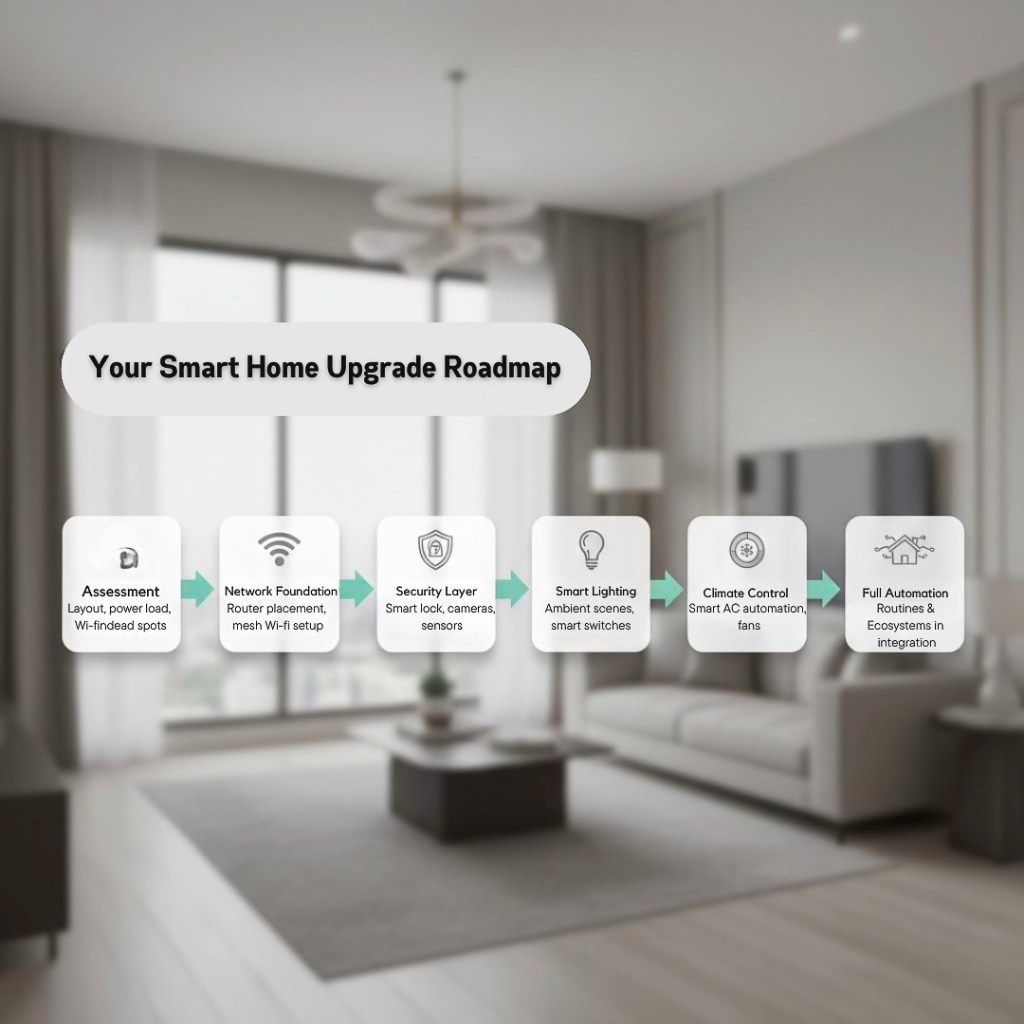
Smart upgrades only shine when installed in the right order. The wrong sequence leads to weak Wi-Fi, overloaded circuits, glitchy automations, and devices that fail when you need them most. This roadmap ensures your condo transforms into a seamless, stable, modern smart home without expensive do-overs.
Follow this framework and every device will sit on a strong, reliable foundation.
Assessment Checklist
Before you buy even one smart bulb, evaluate your unit. Most smart home problems begin with overlooked basics—poor Wi-Fi, outdated routers, overloaded breakers, or condo layouts that disrupt signal flow.
Use this assessment to identify issues early and save thousands in mistakes.
✔ Layout Evaluation
Understand how your condo’s shape affects signal flow and device placement.
What to look for:
- Thick walls or beams that block Wi-Fi
- Long hallways that create signal drop-offs
- Bedroom corners with low connectivity
- Sunlight exposure (for automated blinds and lighting scenes)
- Ideal mounting points for locks, sensors, and switches
Pro Tip:
Units with L-shaped layouts almost always require mesh Wi-Fi.
✔ Electrical Load Check
Smart upgrades draw minimal power—but your circuit’s existing load matters.
Check:
- Breaker panel condition (especially in pre-2015 buildings)
- Existing outlet load
- Whether your unit allows additional outlets
- Signs of overheating or flickering lights
If you plan premium upgrades (switches, blinds, hubs), ask Building Engineering to assess your load allowance.
✔ ISP & Internet Stability Review
Your smart home relies on your router more than any device.
Evaluate:
- Internet speed in each room (use a speed test app)
- Router age (replace if older than 3–4 years)
- Dual-band support (2.4GHz is essential for most smart devices)
- ISP reliability during peak hours
- Latency issues during Zoom calls or streaming
A stable network is 70% of your smart home’s success.
✔ Wi-Fi Dead Spot Mapping
Walk through your unit, phone in hand, and map connectivity.
Check:
- Slow response areas
- High-interference zones (near microwaves, ref refs)
- Corners where sensors may fail
- Spots where mesh nodes might be required
If your Wi-Fi is weak, fix this first. Everything else depends on it.
Prioritization Matrix
Not all upgrades deliver equal impact. Some create instant value; others elevate premium listings. This matrix helps you choose strategically based on goals: ROI, tenant experience, convenience, or resale positioning.
High-Impact, Low-Cost Upgrades
Perfect for first-timers, OFWs, studios, and rental units.
These deliver maximum results with minimal effort.
Recommended First Wave:
- Smart Lock: Biggest listing appeal; solves tenant coordination issues
- Smart AC Controller: Immediate energy savings
- Smart Bulbs: Instant ambiance upgrade
- Smart Plugs: Easy automation without rewiring
- Indoor Cameras: Ideal for OFWs and Airbnb documentation
Owner Insight:
These five upgrades alone can elevate your condo from “basic” to “premium-ready.”
Premium Upgrades for Luxury Listings
These upgrades deliver a polished, hotel-like experience.
Best For:
1BR–2BR end-users | BGC/Makati expat market | upscale resale units
Second Wave Upgrades:
- Smart Switches for a refined look
- Mesh Wi-Fi for full-unit stability
- Motorized Blinds for comfort + energy efficiency
- Automation Hub for full routines
- Multi-Camera Setup for monitoring and safety
These upgrades improve perceived sophistication—key for premium buyers.
Step-by-Step Installation Plan
This is the sequence that ensures everything works together smoothly.
Step 1 — Build the Network Foundation
A smart home with weak Wi-Fi is a beautiful car with no engine.
Do first:
- Upgrade your router
- Install mesh Wi-Fi nodes
- Set up a dedicated 2.4GHz network for IoT
- Rename networks cleanly (“Home-WiFi” / “Home-IoT”)
- Update firmware
Once the network is solid, every device performs better.
Step 2 — Install Security Devices
Security upgrades deliver immediate functional value.
Install
- Smart lock
- Indoor cameras
- Video doorbell (if allowed)
- Motion sensors
- Door/window contact sensors
These instantly raise perceived value and reduce turnover stress.
Step 3 — Add Smart Lighting
Lighting is where your condo suddenly feels “expensive.”
Do next:
- Install smart bulbs or smart switches
- Create lighting scenes (WFH, Relax, Movie Night)
- Add night lights for hallways
Smart lighting boosts ambiance, photos, and viewings.
Step 4 — Upgrade Climate Control
Target the biggest energy consumer in PH condos: the AC.
Upgrade:
- Smart AC controllers
- Smart fans
- Energy monitoring plugs
This helps lower bills and improves tenant satisfaction.
Step 5 — Create Automation Routines
Now that your essentials are installed, connect them.
Examples:
- Good Morning: Lights brighten + AC adjusts + blinds open
- Leaving Home: All lights off + AC turns off + door locks
- Movie Night: Lights dim + AC cools + curtains close
This is where your condo truly feels “smart.”
A smart condo isn’t built by buying gadgets—it’s built through sequence, planning, and structure.Prioritize your network, choose high-impact upgrades first, and automate only after your foundations are solid. Follow this roadmap and your unit becomes a seamless, intuitive, future-ready home.
Costs, Packages & ROI Estimates
Smart upgrades only shine when installed in the right order. The wrong sequence leads to weak Wi-Fi, overloaded circuits, glitchy automations, and devices that fail when you need them most. This roadmap ensures your condo transforms into a seamless, stable, modern smart home without expensive do-overs.
Follow this framework and every device will sit on a strong, reliable foundation.
Smart home upgrades are not expenses—they’re strategic value multipliers. When properly planned, even a ₱15,000 starter setup can deliver thousands of pesos in rental uplift, faster tenant turnover, stronger resale perception, and lower energy consumption.
This section lays out realistic Philippine market pricing, typical device bundles, and projected ROI ranges based on observed performance in Makati, BGC, Ortigas, Mandaluyong, and Quezon City markets.
To make this actionable, packages are broken down into entry-level, mid-tier, and premium brackets—each matched to specific condo types and owner goals.
Entry Level Package (₱15,000–₱30,000)
Best for:
Studio and 1BR rentals, OFW-owned units, budget-focused upgrades, beginner setups
Impact Level: ★★★★☆
What’s Included:
- Smart Lock — ₱4,000–₱15,000
- 2–4 Smart Bulbs — ₱1,500–₱6,000
- Smart Plugs — ₱600–₱1,200 each
Why This Works
Entry-level upgrades hit three powerful tenant triggers:
- Convenience (keyless entry, scheduled lighting, appliance control)
- Security (smart lock access logs)
- Ambiance improvement (warm lighting = better listing photos)
Tenants perceive these as modern comforts normally seen in higher-end units.
Projected ROI
- Rental Uplift: +₱1,000 to ₱2,500/month
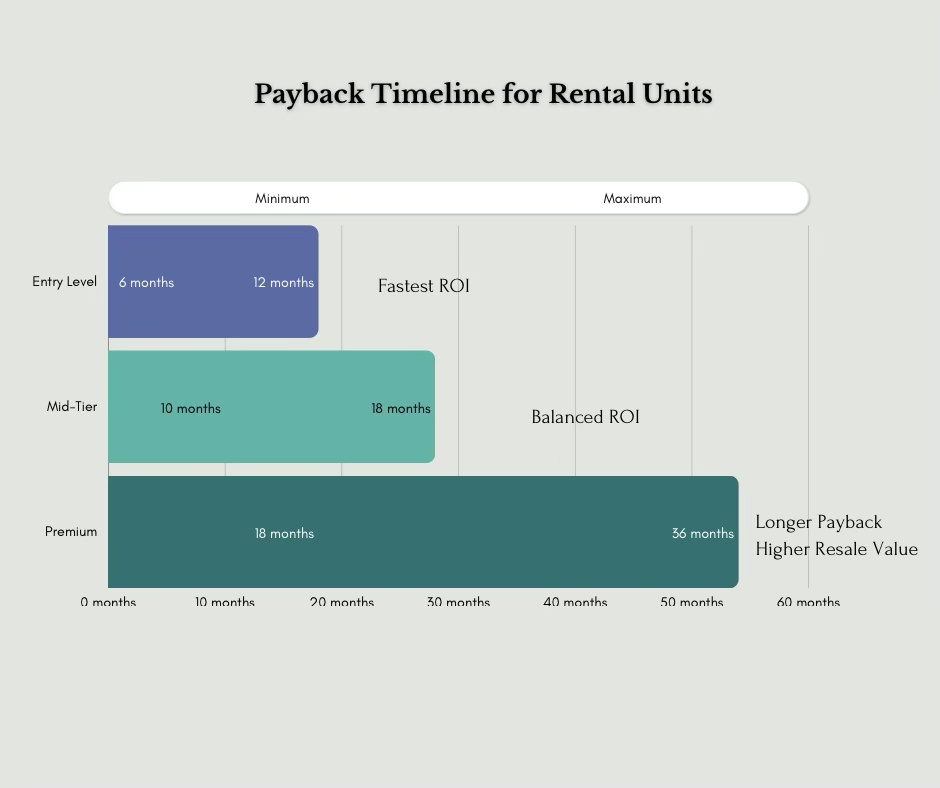
- Payback Period: 6–12 months
- Resale Impact: +₱20,000–₱50,000 in perceived value
Even low-cost lighting alone can dramatically elevate the atmosphere—often enough to outperform similar competing units in the same building.
Mid-Tier Package (₱40,000–₱80,000)
Best for:
1BR–2BR end-users, Airbnb units, long-term investors, premium rentals
Impact Level: ★★★★★
What’s Included:
- Mesh Wi-Fi System — ₱6,000–₱20,000
- Smart AC Controller — ₱3,000–₱9,000
- Video Doorbell — ₱4,000–₱10,000 (if allowed)
- Automation Hub — ₱3,000–₱9,000
Why This Works
Mid-tier setups transform the overall daily experience.
- Mesh Wi-Fi eliminates dead spots in 1BR and 2BR units
- Smart AC controllers cut energy waste
- Video doorbells reduce security uncertainty
- Automation hubs enable routines that feel premium and seamless
Tenants perceive these as modern comforts normally seen in higher-end units.
Projected ROI
- Rental Uplift: +₱2,000 to ₱4,000/month
- Airbnb Occupancy Boost: +10%–20%
- Resale Impact: +₱40,000–₱100,000
- Energy Savings: ₱500–₱1,000 per month (AC automation)
- Payback Period: 10–18 months
For many landlords, this tier delivers the fastest compounding return because it elevates both the photo appeal and the living comfort, which triggers stronger pricing power.
Premium Package (₱120,000–₱250,000)
Best for:
Luxury listings, Rockwell/Verdant/Kroma-level units, expat market, high-end 2BR–3BR buyers
Impact Level: ★★★★★ (Maximum Lifestyle + Resale Leverage)
What’s Included:
- Full Smart Automation System
- Motorized Blinds
- Multiple Smart Cameras
- Smart Switches + Advanced Ambient Lighting
- Premium Mesh Wi-Fi with Ethernet Backhaul (if allowed)
- Professional Installation & Configuration
Why This Works
This package delivers a hotel-grade, lifestyle-driven experience.
Buyers and tenants who choose premium units value:
- Quiet, automated comfort
- Energy efficiency
- Layered security
- Seamless routines
- A refined, minimalist look
Motorized blinds alone send a strong “luxury signal” because they solve two pain points: security and heat control—both top issues in sun-facing condo units.
Projected ROI
- Rental Uplift: +₱4,000 to ₱7,000/month
- Airbnb Impact: +15–30% higher nightly rate
- Resale Premium: +₱80,000–₱200,000
- Energy Efficiency: More stable cooling = consistent savings
- Payback Period: 18–36 months
Premium setups are less about fast ROI and more about market dominance.
These units photograph beautifully, appeal directly to executives, and retain value longer.
Cost & Device Bundle Comparison
| Package Level | Estimated Cost | Included Devices | Rental Uplift | Resale Impact | Best For |
|---|---|---|---|---|---|
| Entry Level | ₱15k–₱30k | Smart lock, bulbs, smart plugs | +₱1k–₱2.5k/mo | Moderate | Studio/1BR rentals, OFW units |
| Mid-Tier | ₱40k–₱80k | Mesh Wi-Fi, AC controller, video doorbell, hub | +₱2k–₱4k/mo | High | 1BR–2BR investors, Airbnb hosts |
| Premium | ₱120k–₱250k | Full automation, blinds, cameras, pro install | +₱4k–₱7k/mo | Very High | Luxury listings, upscale buyers |
Smart upgrades scale with your goals. Whether you want quick ROI, a higher nightly rate, or a premium listing that commands better offers, there’s a package tailored to your strategy. Start small, grow intentionally, and let each upgrade enhance your unit’s comfort, efficiency, and market value.
Compatibility, Privacy & Cybersecurity
A smart home only feels smart when everything works together—smoothly, securely, and without constant troubleshooting. Most problems in Philippine condos happen not because of weak devices, but because of incompatibility, network congestion, and poor cybersecurity hygiene.
This section eliminates that guesswork. You’ll understand which ecosystems work best for Philippine units, which protocols are stable in concrete-heavy buildings, and the cybersecurity must-dos that protect your devices, your data, and your residents.
Ecosystems Compared: Google vs. Alexa vs. Apple HomeKit
Choosing an ecosystem isn’t a tech decision—it’s a lifestyle decision. Pick the wrong one and your smart home becomes a stubborn collection of gadgets that refuse to cooperate.
Below is the PH-focused guide to choosing the right ecosystem.
Google Home — The Filipino Favorite (Most Compatible, Widest Support)
Google Home rules Metro Manila for one reason: compatibility. It works with the majority of smart locks, bulbs, switches, AC controllers, and hubs sold locally.
Strengths:
- Easiest to set up
- Excellent voice recognition
- Affordable smart speakers
- Most Shopee/Lazada devices support Google Home
Best For:
Renters, young professionals, first-time smart home owners, most Android users.
Amazon Alexa — Best Automation Logic (Ideal for Investors & Airbnb Hosts)
Alexa excels in automation flexibility. If you want deeper routines or multi-step workflows, Alexa is the ecosystem that handles complexity without lag.
Strengths:
- Widest device support globally
- Stronger routine workflows (multi-trigger capabilities)
- Ideal for full-home automation
Best For:
Investors, Airbnb operators, multi-device setups.
Apple HomeKit — The Premium, Privacy-First Option
If you want the most secure, tightly controlled system, HomeKit wins. It’s the ecosystem designed for owners who want reliability without budget compromises.
Strengths:
- Highest encryption standards
- Zero-advertising, zero data harvesting
- Best for long-term premium setups
Best For:
Luxury condo owners, families with kids, Apple ecosystem households.
Expert Tip:
Stick to one ecosystem for the core setup.
Mixing ecosystems creates instability, app conflicts, and automations that fail silently. A single platform = a smooth, future-proof system buyers appreciate.
Protocols: Wi-Fi vs. Zigbee vs. Thread (Condo-Friendly Breakdown)
Smart devices communicate using protocols—think of them as the “languages” your gadgets use.
Understanding these prevents common PH condo issues such as delayed responses, dropped devices, and overheating routers.
Wi-Fi (Most Common, Most Demanding)
Best For:
Smart locks, indoor cameras, AC controllers, major appliances.
Strengths:
- No hub required
- Plug-and-play
Weaknesses:
- Overloads older routers
- Too many devices slow down the entire network
- Prone to interference from concrete walls
PH Insight:
If you use more than 10 Wi-Fi devices, upgrade your router or you’ll experience lag.
Zigbee (Low-Power, Highly Reliable, Great for Sensors)
Best For:
Motion sensors, switches, bulbs, contact sensors.
Strengths:
- Doesn’t burden your Wi-Fi
- Stable in concrete-heavy condos
- Low power consumption
- Fast response times
Weaknesses:
- Requires a Zigbee hub
PH Insight:
Zigbee is ideal for condos with multiple sensors or long automation routines—it keeps the network stable and fast.
Thread (The Future of Smart Homes)
Thread is the modern protocol behind Matter-compatible devices.
Strengths:
- Self-healing mesh network
- Fast, secure, and low-power
- Perfect for long-term, scalable systems
Weaknesses:
- Still limited availability in PH retail
Best For:
If you’re planning a premium setup for a resale-ready unit in 2–3 years, Thread future-proofs your investment.
PH-Focused Cybersecurity Recommendations
Smart homes introduce convenience—but also new digital entry points. Philippine condos face unique risks: shared building networks, outdated routers from ISPs, and residents using default passwords.
Strengthen your smart home with these non-negotiable cybersecurity practices.
1. Upgrade Your Router Every 3–4 Years
Old routers = outdated security protocols.
If your ISP-provided router is unbranded or uses old WPA settings, replace it.
2. Use WPA3 or Strong WPA2 Encryption
Ask your ISP to activate the strongest available encryption.
Weak passwords = open doors.
3. Create a Dedicated IoT Network
Separate your personal devices (laptops, phones) from your smart devices.
This limits hacking exposure and improves performance.
4. Enable Two-Factor Authentication (2FA)
Activate 2FA on apps controlling:
- Smart locks
- Cameras
- AC controllers
- Cloud storage
This stops unauthorized access even if login details leak.
5. Update Firmware Religiously
Unpatched firmware is the #1 cause of smart device breaches globally.
Always update before first use.
6. Avoid No-Name, Uncertified Devices
Cheap imports lack:
- encryption
- stable firmware
- PH-based customer support
- secure cloud servers
If the device controls security, access, or video feeds, never go cheap.
7. Clean Your Digital Footprint Before Turnover
Factory reset devices when:
- selling your unit
- turning over to a tenant
- ending an Airbnb guest cycle
Residual accounts ≠ safe.
Leaving logs behind invites privacy liability.
Device Security Checklist for Buyers & Residents
A concise, scannable checklist you can turn into a downloadable asset.
✓ Before Buying
- Confirm device compatibility with your ecosystem
- Check if it supports Matter, Zigbee, or Thread
- Verify PH availability of spare parts & support
- Review HOA/POA rules (especially for locks and cameras)
✓ During Setup
- Change default passwords
- Enable 2FA
- Connect devices to a dedicated IoT network
- Update firmware before first use
- Disable unused guest or secondary accounts
✓ For Daily Use
- Review access logs periodically
- Limit shared access codes (cleaners, caretakers, guests)
- Check battery levels for locks & sensors
- Schedule automatic software updates
- Backup important footage via cloud storag
✓ For Resale or Tenant Turnover
- Reset all devices to factory settings
- Delete old admin accounts
- Hand over documentation of included devices
- Revoke all shared access codes
A smart condo isn’t defined by devices—it’s defined by compatibility and security. Choose one ecosystem, stick to stable protocols, protect your network, and maintain clean turnover processes. Done right, smart upgrades become a long-term asset that boosts buyer confidence, tenant trust, and the resale value of your unit.
9. Staging & Presenting Smart Features in Listings
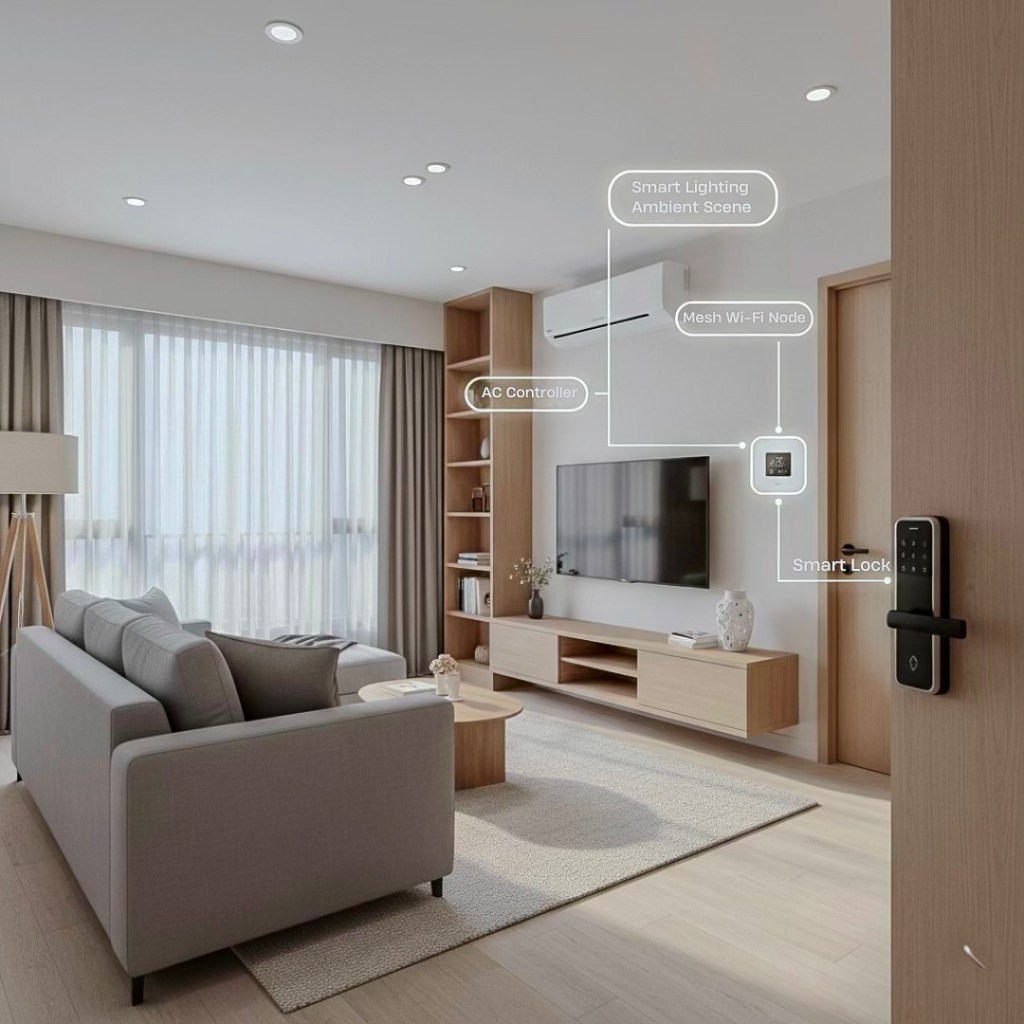
Smart upgrades only create value when buyers and renters notice them. Most listings bury these features behind generic descriptions like “smart-ready” or “with smart lock,” which does nothing to differentiate the property.
The goal of this section is simple:
Make your smart features impossible to ignore—through photography, angles, and listing copy engineered to convert.
When staged correctly, a smart condo instantly feels modern, premium, and more thoughtfully maintained than comparable units in the same building.
How to Highlight Smart Features in Photos
Buyers scroll fast. You have 1–2 seconds to prove your condo is more advanced—and more valuable—than the next listing.
Smart devices must appear organically in your shots: noticeable, but never intrusive.
Key Elements to Highlight:
- Smart lock on the main door
- Ambient smart lighting in the living area and bedroom
- Smart AC controller mounted cleanly
- Mesh Wi-Fi nodes placed intentionally
- Video doorbell (if HOA-approved)
- Automation hub or app screenshot displayed on a phone/tablet
- Motion sensors subtly captured (corners, doorframes)
The subconscious message you want buyers to feel is:
“This unit is thoughtfully upgraded. This owner is meticulous. This condo is worth more.”
Best Angles for Each Smart Feature
Each device requires a specific photographic technique to look premium, intentional, and appealing.
Smart Lock
Angle: 45-degree side angle
Why: Shows depth, shape, and premium finish
Pro Tip:
Ensure the background includes the entryway—this gives context and creates a “hotel-like” impression.
Smart Lighting (Ambient Scenes)
Lighting should communicate emotion. Smart lighting is often your strongest listing visual anchor.
Scene Recommendations:
Warm Evening Mode
ideal for living rooms
Cool WFH Mode
for desks and working areas
Relaxation Mode
bedroom warm dimming
Entertainment Mode
living room with color accents
When to shoot:
Early evening, with curtains partially open
This captures soft daylight plus warm indoor tones.
Smart AC Controller & Sensors
Angle:
Mid-range shot showing the AC, controller, and part of the room.
Why:
It communicates control + comfort + energy efficiency.
Pro Tip:
Show a phone screen with the AC controller app active—this is a strong visual cue that screams “smart.”
This captures soft daylight plus warm indoor tones.
Mesh Wi-Fi Nodes
Angle:
Placed on shelves, side tables, or media consoles. Avoid clutter.
Goal:
Look intentional—not like a random device left out.
Automation Dashboard Shots
This is one of the highest-impact visuals.
Show a phone/tablet displaying routines such as:
- “Good Morning”
- “Leaving Home”
- “Movie Night”
- “Bedtime Mode”
Take the photo with the condo interior blurred softly behind the device.
How to Present Smart Features in Listing Descriptions
Buyers skim, not read.
You must front-load benefits and integrate high-performing PH keywords.
Below are SEO-optimized descriptions for common listing scenarios
Sample 1: Rental Listing — Makati/BGC 1BR
“Fully Upgraded Smart Home 1BR in BGC — Keyless Entry, Smart AC, Mesh Wi-Fi, Ambient Lighting”
Experience modern living with a fully automated condo featuring a smart lock, warm ambient lighting, smart AC controller, and complete mesh Wi-Fi coverage. Perfect for professionals or expats looking for a secure, energy-efficient, and move-in-ready home in BGC.
Sample 2: For Sale — Studio or 1BR
“Smart Condo for Sale in Makati | Smart Lock, Smart Switches, AC Automation, Video Doorbell”
A thoughtfully upgraded home with premium smart features ideal for OFWs, remote workers, or first-time homebuyers. Enjoy keyless access, app-controlled lighting, energy-saving AC automation, and enhanced security features—all included in the sale.
Sample 3: Airbnb-Ready Unit
“Airbnb Smart Home Unit in QC — Self-Check-In, Smart AC, Voice-Controlled Lighting, Mesh Wi-Fi”
Increase your bookings with this fully automated Airbnb unit featuring seamless self-check-in, optimized AC scheduling, fast Wi-Fi, and rich lighting scenes that elevate guest experience and reviews.
Sample 4: High-End 2BR or 3BR Listing
“Luxury Smart Home Condo in Rockwell — Full Automation, Smart Blinds, Premium Wi-Fi, Advanced Security”
This unit offers a hotel-grade smart home experience with automated blinds, motion-activated lighting, energy-efficient cooling, and a high-end mesh network. Designed for discerning buyers seeking comfort, privacy, and a future-ready home.
Why Staging Smart Features Improves Conversion
- Better visual storytelling → higher listing engagement
- Higher perceived modernity → stronger pricing power
- Faster booking or rental decisions → fewer vacancy days
- Clear buyer confidence → reduced negotiation pressure
- Standout effect → your listing looks better than 80% of similar units in the same building
In competitive cities like Makati, BGC, and QC, the condo that looks smarter is the one that gets chosen.
Personas & Use Cases
Smart home upgrades hit differently depending on the person using them. What looks like a simple smart lock to one buyer becomes life-changing convenience to another. A mesh Wi-Fi system may feel “nice to have” for some, while others treat it as non-negotiable as running water.
This section breaks down the five core personas in the Philippine condo market—the ones most likely to pay premiums, choose your listing faster, or value your upgrades deeply.
Understanding them helps owners tailor upgrades to the demographic that matches their unit.
1. OFW Owners Wanting Remote Visibility & Control
Distance creates a unique anxiety: your property is thousands of kilometers away, and you can’t monitor what happens inside. Smart home upgrades eliminate that helplessness.
What They Value Most:
Smart locks
No key handovers, no lost keys, no caretaker coordination
Indoor cameras
Peace of mind, especially during long contracts abroad
AC controllers
Prevents tenants from leaving the AC running 24/7
Activity logs
Real-time visibility on who enters the unit
Primary Pain Point Solved:
“Hindi ko ma-monitor ang unit ko from abroad.”
Smart upgrades turn distance into control. OFWs prioritize reliability and accountability—and these systems give them both.
2. Young Professionals Who Prioritize Ambiance & WFH Productivity
This segment is the fastest-growing smart-home adopter in Metro Manila. They want a condo that fits their lifestyle: stylish, comfortable, and productivity-friendly.
What They Value Most:
WFH lighting presets
Cool daylight for focus, warm dimming after hours
Mesh Wi-Fi
No dead spots during Zoom calls
Voice assistants
Hands-free commands during busy mornings
Smart plugs & routines
Automated mornings (“Lights on, AC to cool, coffee brewing”)
Primary Pain Point Solved:
“Gusto ko ng condo na both cozy and efficient—pang work and pang recharge.”
This persona willingly pays more for comfort, design, and convenience—an ideal target for smart-ready units.
3. Families Who Prioritize Safety, Stability & Sleep Quality
Families aren’t chasing tech for the novelty—they want function, safety, and predictability, especially with kids or elderly parents.
What They Value Most:
Motion-activated night lights
Prevent slips during late-night bathroom trips
Door/window sensors
Additional peace of mind
Baby-monitoring indoor cameras
Extra visibility without disturbing sleep
AC scheduling
Stable temperatures for kids’ bedrooms
Primary Pain Point Solved:
“Gusto namin ng safer, more predictable home for the kids.”
Smart upgrades create an environment that feels calmer, safer, and more controlled—exactly what parents want.
4. Airbnb Hosts Who Need Automation, Not More Work
Short-term rental operators aren’t just managing units—they’re managing chaos: unpredictable check-ins, AC misuse, guest communication, and constant turnovers.
Smart systems tame that chaos.
What They Value Most:
Smart locks
Zero-contact, code-based check-in
Smart AC controllers
Automatically turn off when the unit is empty
Guest Wi-Fi networks
Prevent unauthorized access
Lighting presets
Immediate “reset mode” between bookings
Primary Pain Point Solved:
“Pagod na ako sa manual check-ins and ‘naiwan yung aircon’ moments.”
Automation reduces labor, protects margins, and improves Airbnb reviews—directly boosting rankings and occupancy.
5. Investors Seeking Stronger Rental Yields & Future-Ready Resale Value
Investors treat smart upgrades as financial tools. Their decisions revolve around ROI, differentiation, and resale leverage.
What They Value Most:
Smart lock + lighting combo
Strongest boost to listing photos
Mesh Wi-Fi
Higher tenant satisfaction = fewer vacancies
AC automation
Protects margins through energy efficiency
Full automation
Attracts executives and high-value renters
Primary Pain Point Solved:
“How do I make my unit stand out without expensive renovations?”
Smart upgrades create superior perceived value without structural renovation costs.
For investors, that equals faster turnover + higher monthly returns + stronger negotiation leverage.
Every condo owner has a target persona—even if they don’t realize it yet. Smart home upgrades allow you to tailor your unit to the specific needs, frustrations, and lifestyles of the people most likely to rent or buy from you.
Match the right upgrades to the right persona, and your property stops being “just another listing” and becomes the obvious choice.
Case Studies (3 Mini Examples)
Smart upgrades reshape lives in small, powerful ways. They create comfort where stress used to live, efficiency where routine felt heavy, and profitability where owners felt stuck. These stories reflect the everyday realities of Philippine condo living—and how a few well-planned upgrades can unlock dramatic improvements in value and experience.
Each example highlights before-and-after contrast, cost breakdown, and real-world outcomesrelevant to renters, families, Airbnb operators, and investors.
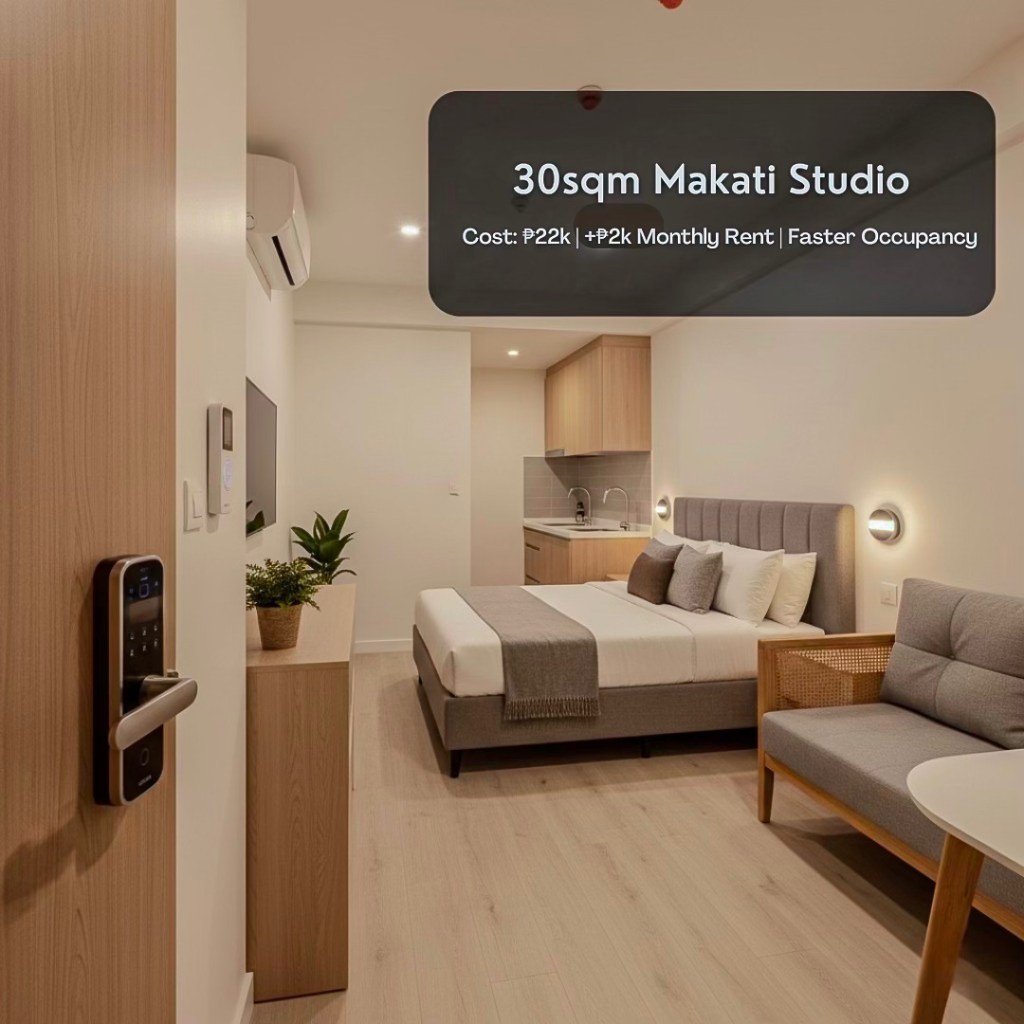
Case 1: The 30sqm Makati Studio That Became the Building Favorite (₱22k Upgrade)
Before: A Studio That Blended Into the Background
Ella owned a compact studio in Makati—prime location, decent layout, competitive price.
But every other studio in the same building looked exactly like hers. She struggled with long vacancies and tenants who never stayed past a year.
Listing photos looked flat.
Lighting was harsh and cold.
And key handovers felt like an errand-based relationship with her tenants.
She wasn’t losing money—she simply wasn’t gaining enough.
The Upgrade — ₱22,000 Total
- Smart lock
- Three warm-ambient smart bulbs
- AC controller
- Two smart plugs
Nothing fancy. Just intentional.
After: A Small Condo With a Big Personality
The transformation stunned even her.
Warm lighting made the unit feel bigger, softer, and—her words—“Instagrammable.”
The smart lock eliminated awkward key meet-ups.
The AC controller trimmed the electricity bill complaints.
When she relisted, her inbox exploded.
One inquiry literally began with:
“Is this the smart studio I saw on TikTok?”
Outcome
- +₱2,000 monthly rent uplift
- Vacancy reduced from 5 weeks to 12 days
- Higher tenant satisfaction (“Hotel vibes po, ma’am”)
- Turnover process improved
Ella now says it was “the easiest ₱22k she’s ever invested.”
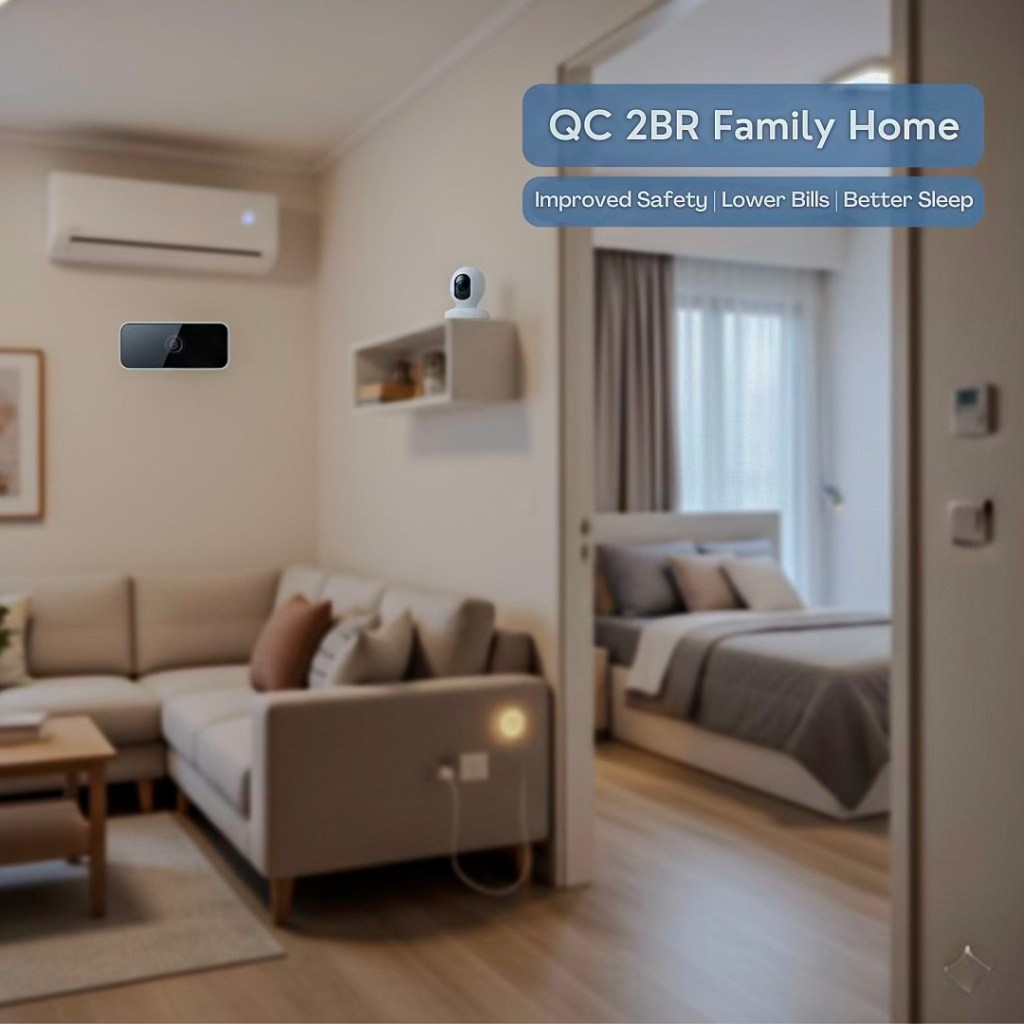
Case 2: The QC 2BR That Finally Became a Family-Friendly Home (₱48k Upgrade)
Before: A Condo That Didn’t Support Their Life
Mark and Liza lived in a 2BR Quezon City condo with their toddler.
The space was nice, but the daily frustrations piled up:
- The hallway lights were blinding at night.
- The AC in the kids’ room was either too cold or too warm.
- The far bedroom had terrible Wi-Fi signal.
- Nights felt chaotic instead of restful.
They didn’t want a renovation—they needed the home to work smarter.
The Upgrade — ₱48,000 Total
- Smart switches + ambient lighting
- Two smart AC controllers
- Motion-activated hallway night lights
- Indoor baby-monitoring camera
- Mesh Wi-Fi system
After: A Smarter, Calmer, Safer Family Space
It was like someone finally pressed “stabilize.”
Night lights glowed gently during midnight diaper changes.
The kids’ AC maintained a perfect, energy-efficient temperature.
Wi-Fi reached every corner—no more buffering tantrums.
The camera provided peace of mind without disrupting sleep.
Relatives who visited kept saying:
“Uy, parang upgraded yung unit.”
Outcome
- ₱700–₱900 monthly electricity savings
- Better sleep for both toddler and parents
- Enhanced safety and convenience
- Future-ready for resale—already staged to impress buyers
Mark summed it up perfectly:
“It didn’t just make the condo smarter—it made our life easier.”
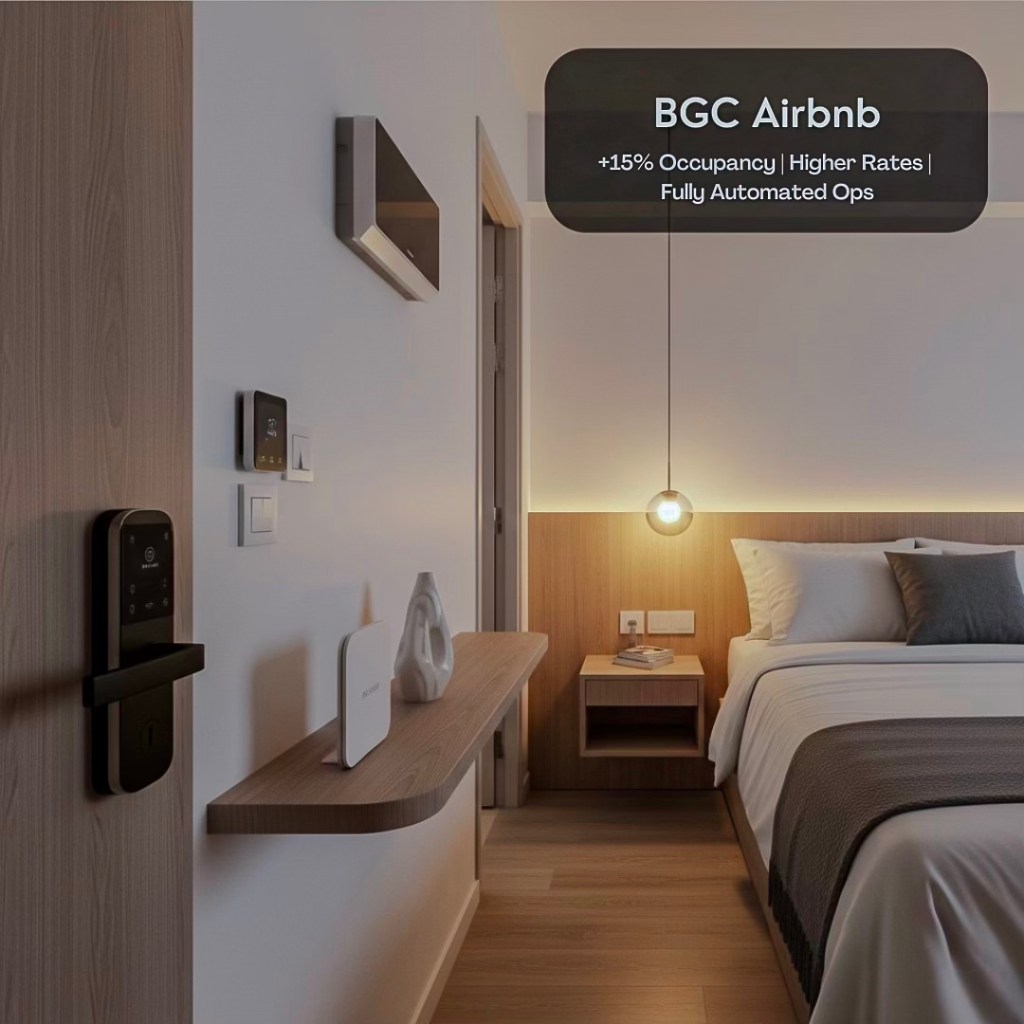
Case 3: The BGC Airbnb That Became Fully Automated—And Fully Booked (₱85k Upgrade)
Before: A Beautiful Unit Buried by Operational Chaos
Jason managed a stylish 1BR Airbnb in BGC.
But despite great furniture and a strong location, operations were draining him:
- Guests left the AC running all day
- Check-ins required unpredictable meet-ups
- Cleaners waited outside for access codes
- Reviews were positive, but not strong enough to justify higher nightly rates
He was running a rental.
He wanted to run a business.
The Upgrade — ₱85,000 Total
- Smart lock with temporary guest codes
- Smart AC controller
- Lighting scenes (“Welcome,” “Relax,” “Reset”)
- Entry-facing indoor camera (allowed by building)
- Mesh Wi-Fi + automation hub
After: A Hands-Off, High-Return Airbnb Operation
Guests checked in using temporary codes—no physical meet-ups.
The AC automatically turned off when the unit was empty.
Cleaners entered using scheduled access, eliminating wasted hours.
Guests walked into a warmly lit, hotel-like space that triggered instant delight.
Reviews transformed overnight:
“Flawless check-in.”
“Loved the smart home features!”
“Best Airbnb experience so far.”
Outcome
- +15% occupancy increase
- +₱800–₱1,200 higher nightly rate
- Stronger Airbnb rankings
- Minimal operational stress
Jason’s takeaway?
“I stopped running a rental.
I started running a system.”
Red Flags & Mistakes to Avoid
Smart upgrades can transform your condo—or quietly sabotage it. Owners often fall into traps that create unstable systems, frustrated tenants, and wasted money. Avoid these pitfalls and your smart home setup will feel polished, reliable, and genuinely premium.
Below are the biggest red flags that Philippine condo owners face when upgrading.
These apply whether you’re setting up a personal home, a rental unit, or an Airbnb operation.
1. Mixing Incompatible Devices (The #1 Smart Home Killer)
This is the most common mistake in Philippine condos: buying whatever is on sale without checking compatibility.
What Happens When You Mix Ecosystems:
- Routines fail silently
- Devices drop offline
- Apps duplicate or conflict
- Your “smart” home turns into a daily troubleshooting session
Common scenario:
Google Home lights + Alexa-only switches + proprietary lock + unsupported thermostat.
Looks modern, works like a headache.
Fix:
Pick ONE primary ecosystem (Google / Alexa / HomeKit) and build your entire setup around it.
Consistency equals stability.
2. Buying Cheap, Unsupported Devices (A Hidden Security Risk)
Unbranded Shopee/Lazada imports might look tempting, especially when they claim the same features as premium brands… but problems surface fast:
The Hidden Risks:
- No firmware updates
- Weak encryption
- Unstable apps
- No PH warranty or support
- Servers hosted on unknown overseas networks
- High risk of device failure
If the device involves security, locks, or camera feeds, low-quality hardware becomes a personal safety risk—not just a tech inconvenience.
Golden Rule:
If the device controls access or records your home, never go cheap.
3. Ignoring Subscription Fees (Silent Profit Killers)
Many smart devices require recurring cloud fees for features like:
- Video storage
- Motion alerts
- Advanced automation
- Multi-device support
- Activity logs
Owners often buy a “₱1,500 smart camera” and later discover a ₱200–₱500 monthly fee per device.
Impact for Rentals & Airbnb:
Recurring costs quietly eat into your margins.
For long-term rentals, this reduces yield.
For Airbnb, this affects your overhead per booking cycle.
Fix:
Before buying, compare:
- Free tier vs. paid tier
- Cloud storage limits
- Device quantity limits
- Optional subscriptions
Choose devices with sustainable long-term costs.
4. Over-Installing Tech That Overwhelms Buyers
Not every buyer or renter wants a spaceship-like condo.
Some want simplicity.
Smart homes fail when the setup becomes too complex or intimidating.
Examples of Overkill:
- Six lighting routines for a 22sqm studio
- Multiple hubs for a small 1BR
- Sensors on every cabinet and surface
- Lighting scenes so complicated guests can’t find the switch
- Excessive automations that trigger unintentionally
This creates the impression that:
“Maganda nga, pero parang ang hirap gamitin.”
That fear reduces buyer interest.
Fix:
Prioritize high-impact, low-friction upgrades:
Smart lock → Smart lighting → Smart AC control → Mesh Wi-Fi
Everything else is optional.
5 Forgetting HOA/POA Rules (The Fastest Way to Get Complaints)
Some owners install hallway-facing cameras or modify the main door without approval—leading to building violations and forced removal.
Red Flags:
- Installing smart doorbells without checking hallway camera rules
- Drilling into structural walls
- Running cables through shared hallways
Fix:
Always check:
- Building house rules
- Engineering department guidelines
- Renovation permit requirements
One email saves you a fine.
6 Neglecting Privacy Considerations (A Legal Risk Under PH Law)
Hidden cameras or undisclosed recording devices can lead to complaints under the Data Privacy Act of 2012—especially in rentals and Airbnb units.
Red Flags:
- Cameras pointing at common areas
- Non-disclosed recording devices
- Smart locks keeping old access logs
- Not resetting devices during turnover
Fix:
Be transparent.
Reset everything.
Disclose all monitoring devices properly.
Quick Summary: Avoid These Smart Home Failures
Hidden cameras or undisclosed recording devices can lead to complaints under the Data Privacy Act of 2012—especially in rentals and Airbnb units.
✘ Mixing incompatible ecosystems
✘ Buying ultra-cheap, unsupported devices
✘ Ignoring cloud subscription fees
✘ Over-automating until the home feels confusing
✘ Violating HOA/POA rules
✘ Neglecting PH privacy laws and turnover resets
A great smart home feels effortless, not intimidating.
These guidelines ensure your setup stays premium, secure, and future-proof.
Legal & Insurance Considerations
Smart home upgrades elevate convenience and security—but they also introduce new layers of legal responsibility. Devices that store data, record video, automate access, or modify electrical systems must be handled correctly during installation, tenant turnover, and resale.
This section clarifies the key legal, documentation, and insurance considerations every Philippine condo owner must follow to avoid disputes, protect themselves, and maintain full compliance with building and national regulations.
Documenting Smart Devices in the Deed of Sale
Smart home devices blur the lines between “fixtures” and “personal property.” That’s why they MUST be formally documented in the Deed of Sale, Inventory List of Deliverables, or Turnover Checklist.
What should be explicitly listed:
- Smart lock brand + model
- Automation hubs
- Smart switches / panels
- Smart thermostats or AC controllers
- Video doorbells
- Indoor cameras
- Mesh Wi-Fi nodes (if included)
- Motorized blinds
- Smart appliances (if bundled: AC, fridge, washer, robot vacuums)
Why it matters:
Avoid disputes
Buyers need clarity on what stays and what goes.
Transfer of ownership
Devices tied to admin accounts must be reset and reassigned.
Warranty transfer
Many smart devices carry warranties redeemable by the new owner.
Legal protection
It prevents buyers from claiming “missing items” after turnover.
Seller Checklist During Turnover:
- Factory reset all devices
- Remove your admin access
- Delete temporary codes (cleaners, guests, caretakers)
- Hand over QR codes, manuals, receipts, and hub logs
- Transfer cloud accounts if applicable
A clean digital handover is now as important as a clean physical one.
Insurance Premium Adjustments
Smart home devices can affect insurance costs—sometimes lowering premiums, sometimes increasing them depending on the installation and device type.
Smart Upgrades That Lower Risk (and may reduce premiums):
- Smart locks (reduced unauthorized entry risk)
- Indoor cameras (better documentation)
- Motion sensors (potential deterrence)
- Smoke/heat sensors (early detection)
Some insurers may offer discounted premiums for enhanced security features. Others may request:
- Photos of devices installed
- Access logs (if applicable)
- Confirmation that devices are professionally installed
Smart Upgrades That May Increase Risk (and premiums):
- DIY electrical modifications
- Unregistered high-load smart switches
- Poorly installed motorized blinds
- Devices that violate condo building rules
Insurance companies want safety—not improvised electronics.
What Insurers Commonly Request:
- Photo documentation of installed devices
- Proof of professional installation (if applicable)
- Inspection by building engineering (for electrical modifications)
- Updated property inventory
- Declaration of access control systems
Tip:
Before installing major automation systems, ask your insurer if they:
- Offer discounts
- Require declarations
- Have limits on camera usage
- Need updated property inventories
Philippine Privacy Requirements (RA 10173 — Data Privacy Act)
Smart devices collect data—sometimes extremely personal data. The Philippine Data Privacy Act regulates how that data is captured, stored, and shared.
Violations can lead to legal complaints, especially for rentals and Airbnb units.
For Camera Placement:
Allowed:
- Indoor cameras facing interior spaces
- Entry-facing cameras inside the unit
- Baby monitors inside private areas
Not Allowed:
- Cameras pointed at hallways, elevators, or common areas
- Cameras capturing neighbors’ doors
- Hidden cameras or undisclosed monitoring devices
Disclosure Requirements:
If you are:
- Renting your unit
- Hosting on Airbnb
- Selling a unit with active cameras
You MUST disclose the presence of cameras—even if they’re not recording.
Hidden cameras in rentals or short-term stays are illegal. Full stop.
For Smart Locks & Access Logs:
While smart locks create better security, their access logs count as personal data.
These logs should be:
- Deleted before turnover
- Cleared between tenants or guests
- Not stored locally if the device changes ownership
A smart lock that still tracks a previous owner—or previous tenant—creates privacy liabilities.
In Summary
- Document every smart device in the Deed of Sale.
- Reset and reassign all devices during turnover.
- Clarify insurance impact before installing electrical or automation systems.
- Follow privacy laws—especially for cameras and access logs.
Smart upgrades elevate your condo. Proper documentation protects you.
Conclusion
A smart condo isn’t just a modern home—it’s a more secure lifestyle, a more efficient living space, and a more profitable investment. When you layer the right upgrades over a well-planned network foundation, you create a unit that adjusts, responds, and enhances daily life without demanding effort. That level of convenience is magnetic. Renters feel it immediately. Buyers recognize it instantly. Investors value it because it compounds returns year after year.
You’ve seen how smart features lift rental premiums, shorten vacancies, reduce energy waste, and dramatically elevate staging and first impressions. You’ve seen how they simplify life for OFWs, families, young professionals, and Airbnb hosts. And you’ve seen how well-designed upgrades turn ordinary units into high-performing real estate assets.
If you’re ready to unlock that same level of advantage for your own property, I can walk you through it—strategically, clearly, and without the frustration that comes with trial and error.
Choose your next step:
✔ Book a Condo Consultation
Get tailored advice on which upgrades suit your unit size, building rules, and target market—so you only invest where it pays off.
✔ Request a Property Review & Smart Upgrade Plan
I’ll assess your layout, market positioning, and rental or resale strategy, then create a custom smart home roadmap for maximum ROI.
✔ Contact Me for Viewing or Investment Guidance
Whether you’re buying, selling, or preparing a unit for rent or Airbnb, you’ll get expert support designed to elevate value and results.
Your smart condo transformation can start today—with clarity, confidence, and a strategy built for the Philippine market.
Let’s make your unit stand out, perform better, and work smarter for years to come.





Leave a reply to Upgrading Your Condominium: Ideas for Renovations and Enhancements – U-Property PH Cancel reply